
I’m constantly exploring new methods to reduce my expenses on the AWS Cloud. As someone who’s already a customer, it’s often challenging to come across such offers. That’s why the announcement of free EC2 instance credits caught my attention. While saving a few dollars might not seem significant, who would turn down the opportunity for free funds on the AWS Cloud?
A Closer Look to the Promotion
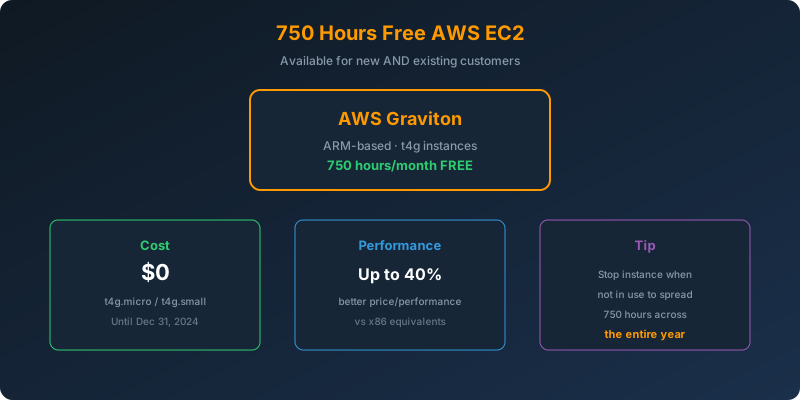
Amazon launched their own AWS Graviton processor and they are using this free EC2 promotion to market their hardware. The promotion is valid until December 31, 2024, and everyone is eligible.
What is AWS Graviton?
It is an Arm-based processor that:
- Reduces your carbon footprint by using up to 60% less energy,
- Optimizes your cost by at least 20% more than x86-based AWS products.
The Free Credits
How to get free AWS credits?
You get a T4g instance which is the next generation instance type with better CPU performance. When compared to older T3 generation instances they deliver up to 40% better price performance.
How do I apply for free AWS credits?
Every customer that runs a t4g.small instance gets automatically 750 free hours. Those hours get deducted from the bill every month.
Caution
If you keep your EC2 instance running continuously, the credits will be depleted within just one month. My suggestion is to extend the usage over the entire year by stopping the EC2 instance during periods when it’s not needed.
Links
More about this promotion.
Conclusion
In conclusion, this article serves as a comprehensive guide for all AWS customers looking to unlock 750 hours of free EC2 usage. The potential for cost savings and the ability to explore and test AWS services without incurring charges make this opportunity valuable for users, especially the long existing users that have spent their free tier.
 Never miss a story from us, subscribe to our newsletter