
The Problem
You use CloudFront to serve private video content backed by S3. You need to control who can access it. But:
- Some clients use custom HTTP libraries that do not support cookies
- Some clients have hardcoded URLs that cannot be modified
One access control method will not serve both.
The Solution
Use both:
- Signed URLs for cookie-less clients
- Signed cookies for clients with fixed URLs
How It Works
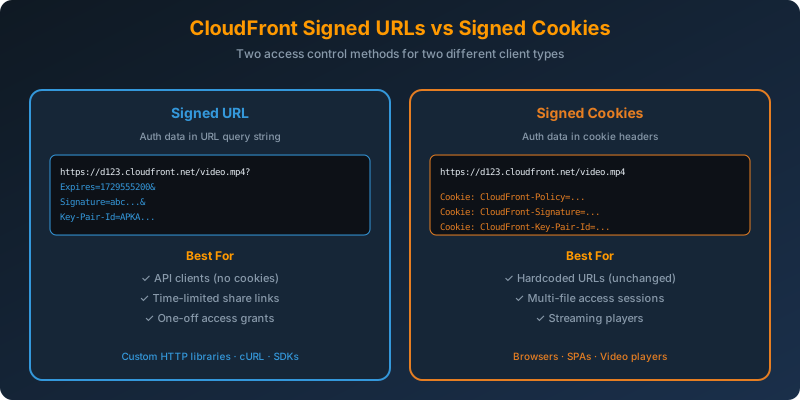
Signed URLs — Auth in the URL
The authentication data lives in query parameters:
1
2
3
4
https://d123.cloudfront.net/private/video.mp4?
  Expires=1729555200&
  Signature=abc123...&
  Key-Pair-Id=APKAEXAMPLE
Perfect for:
- API clients with no cookie jar
- Sharing time-limited links
- One-off access grants
Signed Cookies — Auth in Cookie Headers
The URL is unchanged. Authentication lives in cookies:
1
2
3
Cookie: CloudFront-Policy=eyJTdG...
Cookie: CloudFront-Signature=abc123...
Cookie: CloudFront-Key-Pair-Id=APKAEXAMPLE
Perfect for:
- Existing apps with hardcoded URLs
- Granting access to multiple files with one authentication step
- Streaming players that reference resources by unchanged URL
Generating Signed URLs (Python)
1
2
3
4
5
6
7
8
9
10
11
12
13
14
from botocore.signers import CloudFrontSigner
import rsa, datetime

def rsa_signer(message):
    with open("private_key.pem", "rb") as f:
        private_key = rsa.PrivateKey.load_pkcs1(f.read())
    return rsa.sign(message, private_key, "SHA-1")

signer = CloudFrontSigner("APKAEXAMPLE", rsa_signer)

url = signer.generate_presigned_url(
    "https://d123.cloudfront.net/private/video.mp4",
    date_less_than=datetime.datetime.utcnow() + datetime.timedelta(hours=1)
)
Generating Signed Cookies
Same signing logic, but you produce three cookie values (Policy, Signature, Key-Pair-Id) and set them on the client’s browser.
Trusted Key Groups
Configure the CloudFront distribution with a trusted key group containing your public keys. CloudFront verifies signatures against these keys before serving content.
1
2
3
4
5
aws cloudfront create-key-group \
  --key-group-config '{
    "Name": "video-signers",
    "Items": ["K1EXAMPLE"]
  }'
Attach the key group to the distribution behavior for private paths.
Combining Both Methods in One Distribution
You can enable both signed URL and signed cookie verification on the same behavior. CloudFront accepts either, so you can serve both client types.
Why Not the Alternatives?
AWS AppSync — A managed GraphQL API service. Not related to CloudFront content access control.
JSON Web Token (JWT) — Not natively verified by CloudFront. You would typically use a JWT to authorize a user server-side, then generate a CloudFront signed URL as the final step. JWT alone does not authenticate CloudFront requests.
AWS Secrets Manager — Stores secrets (like your private signing key). Not an access control mechanism for end users.
Key Takeaways
- Signed URLs — auth in the URL query string; use when clients cannot use cookies
- Signed cookies — auth in cookie headers; use when URLs cannot change
- Both methods can be enabled on the same CloudFront behavior
- Use a trusted key group to manage public keys used for verification
- Signed URLs and signed cookies work with both S3 and custom origins behind CloudFront



 Never miss a story from us, subscribe to our newsletter