

The Problem
Partners send you files over SFTP because that is what their systems have done for twenty years. You want the files in S3 for downstream processing, and you refuse to run an EC2 instance with sshd, fail2ban, patch cycles, and a shared home directory that grows without limits.
The Solution
Use AWS Transfer Family. Create an SFTP server, point it at an S3 bucket, and hand the endpoint hostname to your partners. Every file they upload lands as an object in S3 within seconds. There is no server to patch. Authentication can use service-managed users, IAM, LDAP, or Microsoft Active Directory.
How It Works
What Transfer Family Actually Is
Transfer Family is a fully managed service that speaks SFTP, FTPS, and FTP and stores files directly in S3 or EFS. The AWS side of the connection is entirely managed: TLS, SSH keys, patching, high availability. You bring the bucket and the users.
Two endpoint types:
- Public — internet-facing, accessible from anywhere with the correct credentials
- VPC-hosted — private, uses ENIs in your subnets, optionally with an Elastic IP for internet access
Creating an SFTP Server
1
2
3
4
5
6
7
aws transfer create-server \
  --protocols SFTP \
  --identity-provider-type SERVICE_MANAGED \
  --endpoint-type PUBLIC \
  --domain S3 \
  --logging-role arn:aws:iam::123456789012:role/TransferLoggingRole \
  --tags Key=Environment,Value=prod
The command returns a ServerId like s-1234567890abcdef0. The endpoint hostname is s-1234567890abcdef0.server.transfer.eu-west-1.amazonaws.com.
Add a user backed by an S3 home directory:
1
2
3
4
5
6
aws transfer create-user \
  --server-id s-1234567890abcdef0 \
  --user-name acme-partner \
  --role arn:aws:iam::123456789012:role/TransferUserRole \
  --home-directory /uploads-hadzimahmutovic/acme \
  --ssh-public-key-body "ssh-rsa AAAA..."
The IAM Role for the User
The user assumes an IAM role that grants access to the S3 prefix. Keep the scope tight:
1
2
3
4
5
6
7
8
9
10
11
12
13
14
15
16
17
18
{
  "Version": "2012-10-17",
  "Statement": [
    {
      "Effect": "Allow",
      "Action": ["s3:ListBucket"],
      "Resource": "arn:aws:s3:::uploads-hadzimahmutovic",
      "Condition": {
        "StringLike": { "s3:prefix": ["acme/*"] }
      }
    },
    {
      "Effect": "Allow",
      "Action": ["s3:PutObject", "s3:GetObject", "s3:DeleteObject"],
      "Resource": "arn:aws:s3:::uploads-hadzimahmutovic/acme/*"
    }
  ]
}
Active Directory Authentication
Enterprise scenarios usually authenticate SFTP users against on-premises Microsoft Active Directory. Transfer Family integrates with AWS Directory Service (AD Connector or Managed Microsoft AD):
1
2
3
4
5
aws transfer create-server \
  --protocols SFTP \
  --identity-provider-type AWS_DIRECTORY_SERVICE \
  --directory-id d-1234567890 \
  --domain S3
Users log in with their AD credentials. No SSH keys to manage. When you disable the AD account, the SFTP access dies with it.
Testing the Endpoint
1
2
3
sftp -i ~/.ssh/acme_key acme-partner@s-1234567890abcdef0.server.transfer.eu-west-1.amazonaws.com
sftp> put invoice-2026-07.csv
sftp> ls
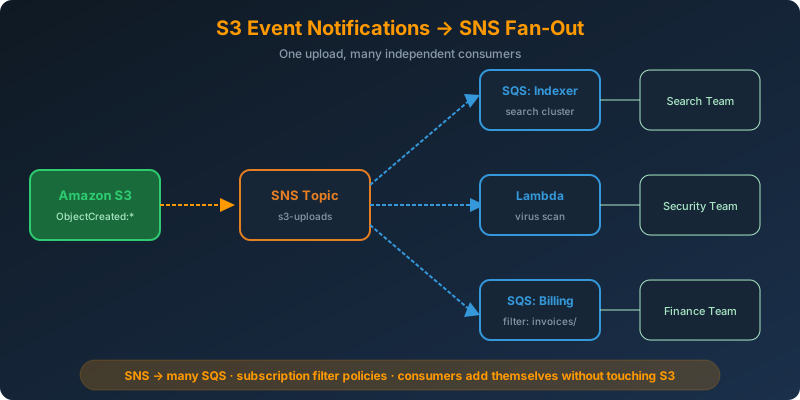
The file appears immediately as s3://uploads-hadzimahmutovic/acme/invoice-2026-07.csv. Wire an S3 event notification to Lambda or SQS if you want automatic processing on arrival.
Pricing Reality
Transfer Family bills per protocol-hour the server is enabled (roughly $0.30/hour = ~$216/month per protocol) plus data transfer. For a one-off migration, use DataSync or the CLI. It fits when partners insist on SFTP as a permanent integration.
Why Not the Alternatives?
Self-hosted SFTP on EC2 — You own patching, hardening, HA, backup, and user management. Every one of these is a page from an operations runbook. Transfer Family removes them all.
S3 File Gateway — Great for hybrid on-premises access to S3 over NFS or SMB, but does not speak SFTP for external partners.
AWS DataSync — Batch replication between file systems and S3. Not an interactive SFTP endpoint for third parties.
Public S3 bucket with presigned URLs — Works for browser uploads, but you cannot force a partner’s legacy SFTP client to speak HTTP.
Key Takeaways
- Transfer Family provides managed SFTP, FTPS, and FTP endpoints backed by S3 or EFS
- Authentication options: service-managed, IAM, custom Lambda, LDAP, or Active Directory
- The IAM role attached to each user controls exactly which S3 prefix they can touch
- Use VPC-hosted endpoints to keep the transfer inside your network
- Combine with S3 event notifications to trigger processing the moment a file lands


 Never miss a story from us, subscribe to our newsletter