
The Problem
Stores upload transaction data to your company via SFTP. Files can exceed 200 GB. Recently, some uploads contained PII that should not have been there. You need:
- Alerts to administrators when PII is detected
- Automated remediation
- Least development effort
The Solution
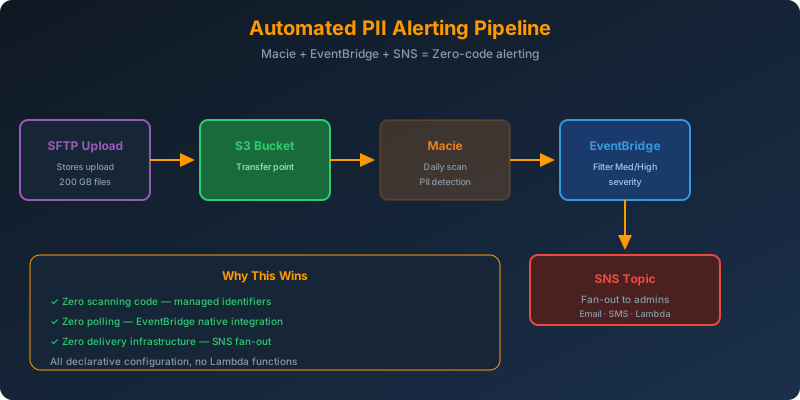
Use S3 as the SFTP transfer point. Configure Amazon Macie to scan uploads and generate findings. Route findings through EventBridge to SNS for administrator notifications.
How It Works
Architecture
1
2
3
4
5
6
7
Store → SFTP (AWS Transfer Family) → S3 (transfer bucket)
                                       ↓
                                    Macie scan
                                       ↓
                                    EventBridge rule
                                       ↓
                                    SNS topic → admin emails
Step 1: Enable Macie and Create a Recurring Job
1
2
3
4
5
6
7
8
9
10
11
12
13
aws macie2 enable-macie

aws macie2 create-classification-job \
  --job-type SCHEDULED \
  --name "sftp-uploads-pii-scan" \
  --schedule-frequency '{"dailySchedule": {}}' \
  --s3-job-definition '{
    "bucketDefinitions": [{
      "accountId": "123456789012",
      "buckets": ["sftp-transfer-bucket"]
    }]
  }' \
  --managed-data-identifier-selector RECOMMENDED
Macie now scans new uploads daily and reports PII findings.
Step 2: Create an EventBridge Rule for Macie Findings
1
2
3
4
5
6
7
8
9
10
{
  "source": ["aws.macie"],
  "detail-type": ["Macie Finding"],
  "detail": {
    "severity": {
      "description": ["Medium", "High"]
    },
    "type": [{ "prefix": "SensitiveData:S3Object" }]
  }
}
Only medium and high severity PII findings trigger the rule. Low severity is noise.
Step 3: SNS Topic That Notifies Admins
1
2
3
4
5
6
aws sns create-topic --name macie-pii-alerts

aws sns subscribe \
  --topic-arn arn:aws:sns:us-east-1:123456789012:macie-pii-alerts \
  --protocol email \
  --notification-endpoint [email protected]
Wire the EventBridge rule to the SNS topic as its target. Every PII finding now pages the admin team.
The Full Terraform Snippet
1
2
3
4
5
6
7
8
9
10
11
12
13
14
15
resource "aws_cloudwatch_event_rule" "macie_pii" {
  name = "macie-pii-findings"
  event_pattern = jsonencode({
    source = ["aws.macie"]
    detail-type = ["Macie Finding"]
    detail = {
      severity = { description = ["Medium", "High"] }
    }
  })
}

resource "aws_cloudwatch_event_target" "sns" {
  rule = aws_cloudwatch_event_rule.macie_pii.name
  arn  = aws_sns_topic.pii_alerts.arn
}
Why This Is the Least Development Effort
- Zero scanning code — Macie’s managed identifiers handle detection
- Zero polling — EventBridge subscribes to Macie findings natively
- Zero delivery infrastructure — SNS handles fan-out to email, SMS, or Lambda
The entire pipeline is declarative configuration.
Why Not the Alternatives?
Amazon Inspector for S3 PII scans — Inspector scans EC2/ECR for software vulnerabilities. It does not read S3 object content.
Custom Lambda scanning algorithm + SNS — Building reliable PII detection is a research problem. Regex misses variations; ML models require training data. That is far more development effort than Macie.
Custom Lambda + SES + S3 lifecycle for removal — Same custom scanning problem, plus lifecycle policies cannot be triggered by security findings.
Key Takeaways
- Amazon Macie is a managed service — no custom scanning code needed for PII detection
- EventBridge natively receives Macie findings — no polling required
- Filter events by severity in the EventBridge rule to reduce noise
- For automated remediation, target a Lambda from EventBridge to move or delete infected objects
- Do not confuse Inspector (EC2/container vulnerabilities) with Macie (S3 sensitive data)



 Never miss a story from us, subscribe to our newsletter