
The Problem
Your S3 bucket contains millions of objects uploaded before encryption was configured. You need every existing object encrypted and every future upload encrypted automatically, with the least operational effort.
The Solution
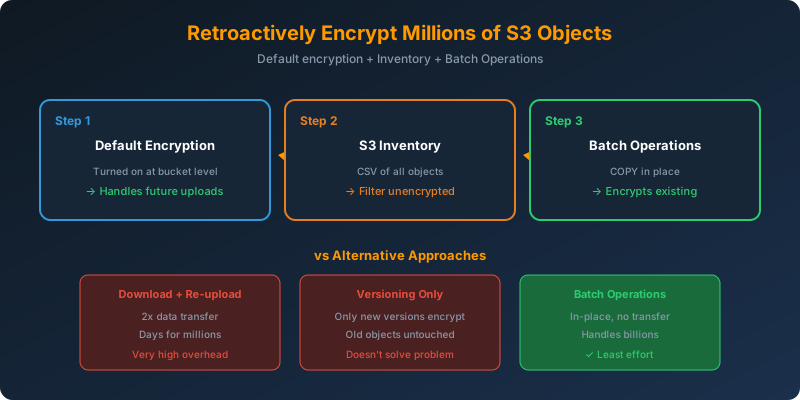
Three moves:
- Turn on default encryption for future uploads
- Generate an S3 Inventory report to list all objects
- Run an S3 Batch Operations copy job to encrypt the existing objects in place
How It Works
Step 1: Turn On Default Encryption
1
2
3
4
5
6
7
8
9
aws s3api put-bucket-encryption \
  --bucket serverless-site \
  --server-side-encryption-configuration '{
    "Rules": [{
      "ApplyServerSideEncryptionByDefault": {
        "SSEAlgorithm": "AES256"
      }
    }]
  }'
From this moment forward, every new upload is encrypted with SSE-S3. Existing objects remain untouched.
Step 2: Generate an Inventory Report
1
2
3
4
5
6
7
8
9
10
11
12
13
14
15
16
aws s3api put-bucket-inventory-configuration \
  --bucket serverless-site \
  --id all-objects \
  --inventory-configuration '{
    "Destination": {
      "S3BucketDestination": {
        "Bucket": "arn:aws:s3:::inventory-output",
        "Format": "CSV"
      }
    },
    "IsEnabled": true,
    "Id": "all-objects",
    "IncludedObjectVersions": "Current",
    "OptionalFields": ["EncryptionStatus", "Size"],
    "Schedule": { "Frequency": "Daily" }
  }'
Wait 24-48 hours for the first inventory to be delivered. Filter the CSV for objects where EncryptionStatus is NOT-SSE.
Step 3: Batch Operations Copy Job
1
2
3
4
5
6
7
8
9
10
11
12
13
14
15
16
17
18
19
20
21
22
23
aws s3control create-job \
  --account-id 123456789012 \
  --operation '{
    "S3PutObjectCopy": {
      "TargetResource": "arn:aws:s3:::serverless-site",
      "NewObjectMetadata": {
        "SSEAlgorithm": "AES256"
      }
    }
  }' \
  --manifest '{
    "Spec": {
      "Format": "S3InventoryReport_CSV_20211130"
    },
    "Location": {
      "ObjectArn": "arn:aws:s3:::inventory-output/manifest.json",
      "ETag": "..."
    }
  }' \
  --report '{ "Bucket": "arn:aws:s3:::batch-report", "Format": "Report_CSV_20180820", "Enabled": true }' \
  --priority 1 \
  --role-arn arn:aws:iam::123456789012:role/S3BatchRole \
  --confirmation-required
The copy operation copies each object back to itself with the encryption metadata set. Batch Operations handles retries, concurrency, and reporting.
Why This Beats the Alternatives
For millions of objects, cost and time comparison:
| Method | Data Transfer | Time | Operational Complexity |
|---|---|---|---|
| Inventory + Batch Ops copy | None (in-place) | Hours | Low |
| Download and re-upload | ~2x data size (up + down) | Days | Very high |
| Manual console updates | None | Impossible | Insane |
Why Versioning Alone Does Not Work
You might think enabling versioning + SSE-KMS will encrypt everything as objects are updated. It won’t:
- Versioning only creates a new version when you modify an object
- Existing untouched objects stay at their unencrypted state forever
- The new “default encryption” only applies to new writes
Why Not the Alternatives?
Download all objects locally, then re-upload to a new bucket — Bandwidth-intensive, days of transfer time, and you must update all references. Highest possible effort.
Enable versioning + SSE-KMS, hope for the best — Objects only get re-encrypted when they are overwritten. Static objects stay unencrypted forever.
Console click-through — Manual, slow, error-prone. Not viable for millions of objects.
Key Takeaways
- Default encryption handles future uploads automatically
- S3 Inventory provides a manifest of all objects with encryption status
- S3 Batch Operations Copy encrypts objects in place — no data transfer out of S3
- Versioning does not auto-encrypt existing objects
- This is the AWS-endorsed pattern for retroactive encryption at scale



 Never miss a story from us, subscribe to our newsletter