
The Problem
Your image hosting company stores objects in S3. You want to prevent accidental public exposure of any object in the entire account. No bucket, no matter who creates it, should ever be public.
The Solution
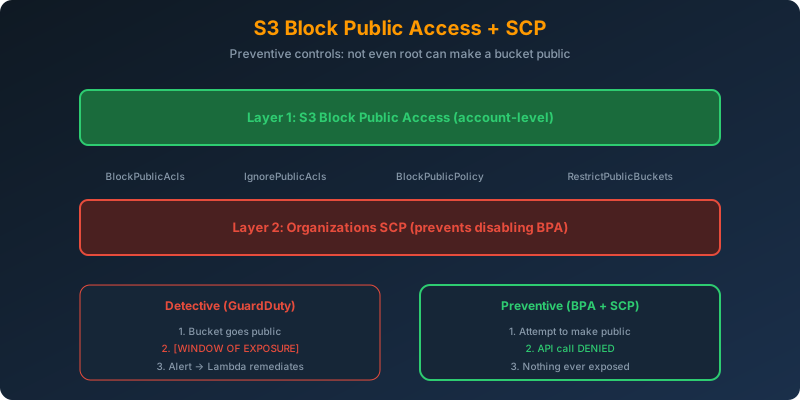
Two preventive controls stacked:
- S3 Block Public Access at the account level: prevents any bucket from becoming public
- Organizations SCP that prevents IAM users (including root) from disabling that setting
Together they make public exposure impossible.
How It Works
Step 1: Enable Account-Level Block Public Access
1
2
3
4
aws s3control put-public-access-block \
  --account-id 123456789012 \
  --public-access-block-configuration \
    "BlockPublicAcls=true,IgnorePublicAcls=true,BlockPublicPolicy=true,RestrictPublicBuckets=true"
The four settings do different things:
| Setting | What It Blocks |
|---|---|
BlockPublicAcls |
Rejects any request to set a public ACL |
IgnorePublicAcls |
Existing public ACLs are ignored |
BlockPublicPolicy |
Rejects any bucket policy that allows public access |
RestrictPublicBuckets |
Existing public buckets become inaccessible to unsigned callers |
All four true = maximum lockdown.
Step 2: Wrap It in an SCP
Detective controls only work after the fact. An SCP is preventive. It stops the API call before it happens.
1
2
3
4
5
6
7
8
9
10
11
12
{
  "Version": "2012-10-17",
  "Statement": [{
    "Sid": "PreventBpaChanges",
    "Effect": "Deny",
    "Action": [
      "s3:PutAccountPublicAccessBlock",
      "s3:PutBucketPublicAccessBlock"
    ],
    "Resource": "*"
  }]
}
Attach this SCP to the account (or root OU). Now no principal in the account can turn off Block Public Access — not even the root user.
Why Preventive Beats Detective
Detective controls (like GuardDuty finding a public bucket or Trusted Advisor alerting) have a time-to-detection gap. During that window, the bucket is publicly exposed. Preventive controls close that window entirely.
1
2
Detective:  Bucket goes public → Alert fires → Human/Lambda fixes → [Window of exposure]
Preventive: Attempt to make public → API call denied → No window
Why Not the Alternatives?
GuardDuty + Lambda remediation: detective and reactive. There is always a window where the bucket is public. Also depends on GuardDuty being enabled and Lambda succeeding.
Trusted Advisor with email alerts: slow detection cycle, manual remediation. Weakest option.
Resource Access Manager to find public buckets: RAM is for sharing resources across accounts, not for detecting public buckets. Completely unrelated to this problem.
Key Takeaways
- Preventive controls stop the bad action; detective controls notice after the fact
- Enable all four Block Public Access settings: they cover different attack surfaces
- Wrap Block Public Access in an SCP so even root cannot disable it
- SCPs apply to every principal in the account, including the root user
- Combine account-level BPA with bucket-level BPA for defense in depth on shared accounts



 Never miss a story from us, subscribe to our newsletter