
The Problem
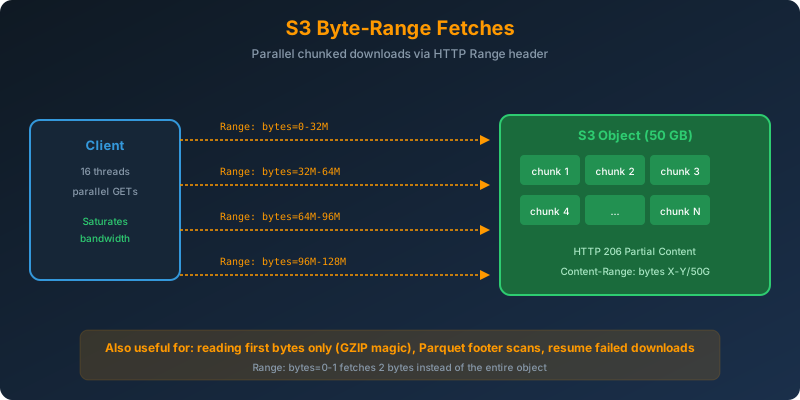
You have a 50 GB video file in S3 that a downstream worker fleet needs to pull as fast as possible. A single GET on the whole object gives you one TCP connection and one thread. You leave most of your network bandwidth on the table.
Or the opposite: you only need the first 4 bytes of every GZIP file in a bucket to verify magic numbers. Pulling the whole file is wasteful.
The Solution
Use S3 byte-range fetches. Send a Range HTTP header on a GET request, and S3 returns only the requested byte range. You can:
- Split a large object into N ranges and download them in parallel from N threads
- Read only the first few bytes for header inspection or content-type sniffing
- Resume a broken download from the exact byte where it stopped
How It Works
The Range Header
The Range header uses standard HTTP semantics (inclusive byte offsets, zero-indexed).
1
2
3
4
Range: bytes=0-9999           # First 10,000 bytes
Range: bytes=10000-19999      # Next 10,000 bytes
Range: bytes=-500             # Last 500 bytes
Range: bytes=1000-            # From byte 1000 to end
S3 responds with HTTP 206 Partial Content and a Content-Range header confirming what it returned.
Parallel Download in Python
1
2
3
4
5
6
7
8
9
10
11
12
13
14
15
16
17
18
19
20
21
22
23
24
25
26
27
import boto3
import concurrent.futures

s3 = boto3.client("s3")
BUCKET = "media-archive"
KEY = "raw/lecture-2026-07.mp4"
CHUNK = 32 * 1024 * 1024  # 32 MB per range

head = s3.head_object(Bucket=BUCKET, Key=KEY)
size = head["ContentLength"]

def fetch(start):
    end = min(start + CHUNK - 1, size - 1)
    resp = s3.get_object(
        Bucket=BUCKET, Key=KEY,
        Range=f"bytes={start}-{end}"
    )
    return start, resp["Body"].read()

ranges = range(0, size, CHUNK)
with concurrent.futures.ThreadPoolExecutor(max_workers=16) as pool:
    parts = list(pool.map(fetch, ranges))

parts.sort()
with open("lecture.mp4", "wb") as f:
    for _, data in parts:
        f.write(data)
Sixteen parallel range requests will saturate a fast pipe far better than a single sequential GET. This is what the AWS SDK’s high-level transfer manager does under the hood.
Reading Only the First Bytes
Verify GZIP magic numbers without downloading:
1
2
3
4
5
6
7
resp = s3.get_object(
    Bucket="archive",
    Key="dumps/database.sql.gz",
    Range="bytes=0-1"
)
magic = resp["Body"].read()
assert magic == b"\x1f\x8b", "Not a valid GZIP file"
Two bytes over the wire, not the whole file. Multiply this across a million objects and the savings add up.
Resuming a Failed Download
If your download crashes at byte 4,500,000,000 out of 50 GB, resume with:
1
2
3
4
5
aws s3api get-object \
  --bucket media-archive \
  --key raw/lecture-2026-07.mp4 \
  --range "bytes=4500000000-" \
  lecture.mp4.partial
Concatenate the pieces and you have the full file. No wasted bandwidth.
When Byte-Range Fetches Beat Multipart Download
- Very large objects (>100 MB): parallelism scales throughput linearly up to your bandwidth ceiling
- Head-of-file reads: image thumbnails, video metadata, GZIP headers
- Range-scan analytics: Parquet or ORC readers pulling only the footer and specific column chunks
For anything under a few hundred MB with a fast connection, a single GET is fine.
Why Not the Alternatives?
Single-threaded GET on the whole object: Bounded by TCP window size and single-connection throughput. Slow for very large objects.
S3 Transfer Acceleration: Speeds up long-distance transfers by routing through CloudFront edges. Complementary to byte-range, not a substitute. You can still parallelize with ranges over the accelerated endpoint.
Copy the object to a closer region first: Adds cost, latency, and eventual consistency issues. Byte-range fetches on the original bucket are simpler.
Download the whole file to read the first 4 bytes: Wasteful at any scale, and worse for larger objects.
Key Takeaways
- Byte-range fetches use the HTTP
Rangeheader and return HTTP 206 Partial Content - Split large objects into ranges and download them in parallel to saturate bandwidth
- Read only the bytes you need. Perfect for magic-number checks, thumbnails, and columnar formats
- Combine with retry logic to resume failed downloads without starting over
- The AWS SDK’s high-level transfer manager already uses this pattern for multi-threaded downloads



 Never miss a story from us, subscribe to our newsletter