
The Problem
You are migrating a marketing website from on-premises to AWS. It is entirely static, updated infrequently, and needs to be the most cost-effective and resilient origin possible for a CloudFront distribution.
The Solution
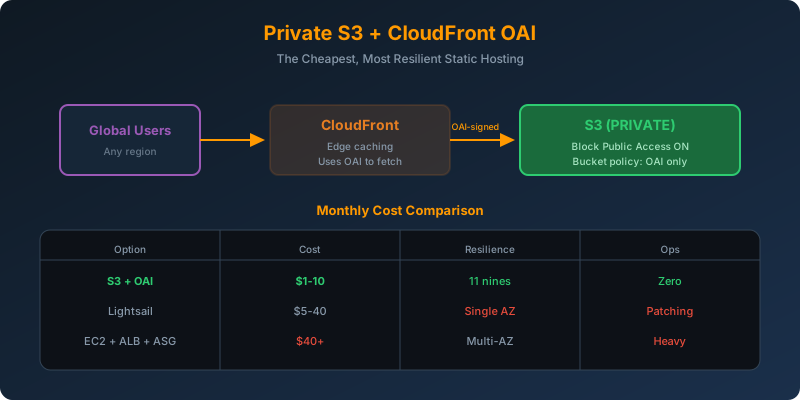
Create a private S3 bucket as the CloudFront origin. Use a CloudFront Origin Access Identity (OAI) in the bucket policy so only CloudFront can read the objects.
How It Works
Architecture
1
2
3
User → CloudFront (edge caching) → S3 (private, OAI-only)
                                     ↑
                                     └─ Bucket policy allows OAI, denies everyone else
Step 1: Create the OAI
1
2
3
aws cloudfront create-cloud-front-origin-access-identity \
  --cloud-front-origin-access-identity-config \
  CallerReference=marketing-site-oai,Comment="OAI for marketing site"
Save the returned OAI ID; you’ll need it for the bucket policy.
Step 2: Attach the Bucket Policy
1
2
3
4
5
6
7
8
9
10
11
12
{
  "Version": "2012-10-17",
  "Statement": [{
    "Sid": "AllowOAIReadOnly",
    "Effect": "Allow",
    "Principal": {
      "AWS": "arn:aws:iam::cloudfront:user/CloudFront Origin Access Identity E1XXXXXXXXXXXX"
    },
    "Action": "s3:GetObject",
    "Resource": "arn:aws:s3:::marketing-content/*"
  }]
}
Also enable S3 Block Public Access; this is a private bucket.
Step 3: Upload Content With the CLI
1
2
aws s3 sync ./website s3://marketing-content/ \
  --cache-control "public, max-age=86400"
The AWS CLI handles authentication automatically. No SFTP server, no separate transfer service, no cost.
Why This Beats Every Other Option
| Approach | Monthly Cost (typical) | Resilience | Ops Burden |
|---|---|---|---|
| S3 + CloudFront + OAI | ~$1-10 | 11 nines durability, global edge | Zero |
| Lightsail instance | ~$5-40 | Single instance | Patching, monitoring |
| EC2 + ALB + Auto Scaling | ~$40+ | Multi-AZ | Full server management |
| Public S3 + Transfer Family | ~$25+ hourly | High | Manage SFTP config |
OAI vs OAC — Choose OAC for New Distributions
Origin Access Control (OAC) is the newer replacement for OAI. Use OAC when:
- Your bucket is encrypted with a customer-managed KMS key
- You want SigV4 signing (stronger security)
- You want support for all AWS Regions (OAI has limits in some newer Regions)
OAI still works and is simpler for basic setups.
Why Not the Alternatives?
Lightsail virtual server: Requires 24/7 server rental for infrequent updates. Higher cost and single point of failure.
Auto Scaling Group + ALB: ~$40+/month plus full server management for content that rarely changes.
Public S3 + AWS Transfer for SFTP: Making the bucket public is a security downgrade; users can bypass CloudFront. Transfer Family also has hourly costs for infrequent uploads.
Key Takeaways
- Private S3 + CloudFront + OAI is the cheapest option in the table: ~$1-10/month, 11 nines durability, zero ops burden
- Keep the origin bucket private; a public bucket lets users bypass CloudFront and its CDN benefits
- Use the AWS CLI or
aws s3 syncfor uploads; no SFTP server needed - For new distributions, prefer OAC over OAI, especially with SSE-KMS
- Enable S3 Block Public Access on any bucket serving as a CloudFront origin



 Never miss a story from us, subscribe to our newsletter