
The Problem
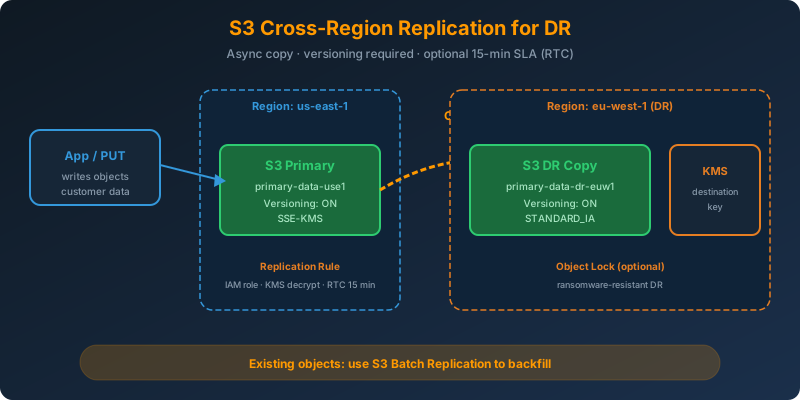
Your primary S3 bucket lives in us-east-1 and holds the customer data your business runs on. A Regional outage, or a bad process that corrupts objects, would leave you with nothing. You need every new object to land in a second AWS Region automatically, ready to take over as the DR copy.
The Solution
Enable S3 Cross-Region Replication (CRR). Turn on versioning on both source and destination buckets, create a replication rule, and every new or updated object is asynchronously copied to the second Region. Existing objects can be backfilled with S3 Batch Replication.
How It Works
The Prerequisites
CRR has two hard requirements:
- Versioning enabled on both the source and destination buckets
- An IAM role that S3 can assume to read from source and write to destination
Without versioning, replication cannot run at all.
Enable Versioning on Both Buckets
1
2
3
4
5
6
7
8
aws s3api put-bucket-versioning \
  --bucket primary-data-use1 \
  --versioning-configuration Status=Enabled

aws s3api put-bucket-versioning \
  --bucket primary-data-dr-euw1 \
  --versioning-configuration Status=Enabled \
  --region eu-west-1
The Replication IAM Role
1
2
3
4
5
6
7
8
9
10
11
12
13
14
15
16
17
18
19
20
21
22
23
24
25
{
  "Version": "2012-10-17",
  "Statement": [
    {
      "Effect": "Allow",
      "Action": [
        "s3:GetReplicationConfiguration",
        "s3:ListBucket",
        "s3:GetObjectVersionForReplication",
        "s3:GetObjectVersionAcl",
        "s3:GetObjectVersionTagging"
      ],
      "Resource": ["arn:aws:s3:::primary-data-use1", "arn:aws:s3:::primary-data-use1/*"]
    },
    {
      "Effect": "Allow",
      "Action": [
        "s3:ReplicateObject",
        "s3:ReplicateDelete",
        "s3:ReplicateTags"
      ],
      "Resource": "arn:aws:s3:::primary-data-dr-euw1/*"
    }
  ]
}
Attach it to a role with a trust policy for s3.amazonaws.com.
The Replication Rule
1
2
3
4
5
6
7
8
9
10
11
12
13
14
15
16
17
18
19
20
21
22
23
24
aws s3api put-bucket-replication \
  --bucket primary-data-use1 \
  --replication-configuration '{
    "Role": "arn:aws:iam::123456789012:role/S3ReplicationRole",
    "Rules": [{
      "ID": "dr-to-euw1",
      "Status": "Enabled",
      "Priority": 1,
      "Filter": {},
      "DeleteMarkerReplication": { "Status": "Enabled" },
      "Destination": {
        "Bucket": "arn:aws:s3:::primary-data-dr-euw1",
        "StorageClass": "STANDARD_IA",
        "ReplicationTime": {
          "Status": "Enabled",
          "Time": { "Minutes": 15 }
        },
        "Metrics": {
          "Status": "Enabled",
          "EventThreshold": { "Minutes": 15 }
        }
      }
    }]
  }'
Notable settings:
DeleteMarkerReplication— replicates delete markers so DR reflects the same current object stateReplicationTime(RTC) — S3 Replication Time Control gives a 15-minute SLA with CloudWatch metrics, at an extra chargeStorageClass— DR copies can land directly in a cheaper class
Encrypted Objects Need Extra Wiring
If the source bucket uses SSE-KMS, the replication role also needs kms:Decrypt on the source key and kms:GenerateDataKey on the destination key. Explicitly enable KMS replication in the config:
1
2
3
4
5
6
7
8
"SourceSelectionCriteria": {
  "SseKmsEncryptedObjects": { "Status": "Enabled" }
},
"Destination": {
  "EncryptionConfiguration": {
    "ReplicaKmsKeyID": "arn:aws:kms:eu-west-1:123456789012:key/..."
  }
}
Existing Objects Do Not Replicate Automatically
CRR only replicates objects created after the rule is enabled. To backfill:
1
2
3
4
5
6
7
8
aws s3control create-job \
  --account-id 123456789012 \
  --operation '{ "S3ReplicateObject": {} }' \
  --manifest '{ ... inventory manifest ... }' \
  --priority 10 \
  --role-arn arn:aws:iam::123456789012:role/S3BatchRole \
  --report '{ ... }' \
  --confirmation-required
That runs S3 Batch Replication across the inventory of pre-existing objects.
What CRR Does Not Replicate
- Objects that existed before the rule (unless you run Batch Replication)
- Objects encrypted with SSE-C
- Lifecycle expiration actions on the source (destination lifecycle runs independently)
- Objects replicated into the source bucket by another replication rule, unless you enable
ExistingObjectReplication
Why Not the Alternatives?
S3 Cross-Region snapshots — S3 has no native snapshot concept. There is nothing to schedule.
Nightly aws s3 sync cron job — Works, but you now own the scheduler, IAM, monitoring, and the delta calculation. CRR runs continuously with S3-managed retries.
Global Accelerator or CloudFront — These accelerate access to the primary bucket. They do not create a second physical copy in another Region.
Same-Region Replication — SRR keeps the copy in the same Region, so a Regional outage still takes both copies down. For DR, you need CRR.
Key Takeaways
- CRR requires versioning on both source and destination buckets
- Use Replication Time Control (RTC) for a 15-minute SLA when RPO matters
- Batch Replication handles the backfill for pre-existing objects
- SSE-KMS objects need explicit KMS permissions and a destination key configuration
- Combine CRR with Object Lock on the destination for a ransomware-resistant DR copy



 Never miss a story from us, subscribe to our newsletter