
The Problem
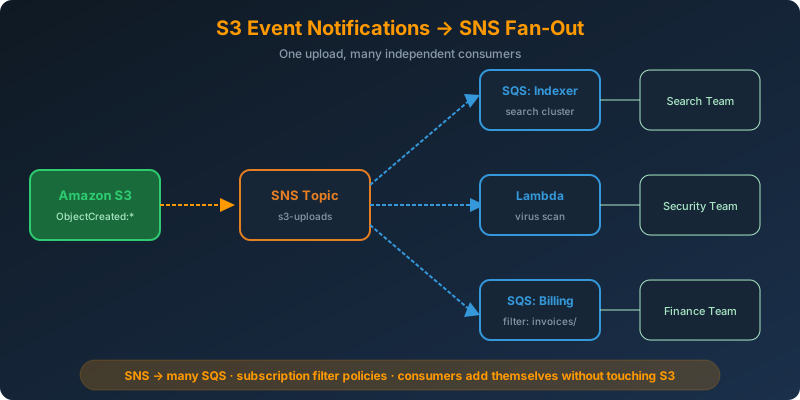
A new object lands in S3 and three different teams need to react: one indexes it in a search cluster, one runs a virus scan, one bills the customer. They cannot share a queue, they cannot share a Lambda, and none of them can block the others.
The Solution
Send the S3 event to an SNS topic. Subscribe multiple SQS queues and Lambda functions to that topic. SNS delivers a copy of every event to every subscriber. Each consumer processes independently at its own pace.
How It Works
The Fan-Out Pattern
SNS is a pub/sub broker. When S3 publishes an event to the topic, SNS pushes one message to each subscriber:
1
2
3
S3 upload → SNS topic → SQS queue (indexer)
                      → SQS queue (billing)
                      → Lambda   (virus scan)
If the virus scanner is down, the indexer keeps working. If billing needs to reprocess, it reads from its own queue. The teams are decoupled.
Configuring the SNS Topic Policy
The bucket needs permission to publish. Attach this to the topic:
1
2
3
4
5
6
7
8
9
10
11
12
13
{
  "Version": "2012-10-17",
  "Statement": [{
    "Effect": "Allow",
    "Principal": { "Service": "s3.amazonaws.com" },
    "Action": "sns:Publish",
    "Resource": "arn:aws:sns:eu-west-1:123456789012:s3-uploads",
    "Condition": {
      "ArnLike": { "aws:SourceArn": "arn:aws:s3:::uploads-hadzimahmutovic" },
      "StringEquals": { "aws:SourceAccount": "123456789012" }
    }
  }]
}
Attaching the Notification
1
2
3
4
5
6
7
8
9
aws s3api put-bucket-notification-configuration \
  --bucket uploads-hadzimahmutovic \
  --notification-configuration '{
    "TopicConfigurations": [{
      "Id": "sns-fanout",
      "TopicArn": "arn:aws:sns:eu-west-1:123456789012:s3-uploads",
      "Events": ["s3:ObjectCreated:*"]
    }]
  }'
Subscribing Consumers
Subscribe each SQS queue to the topic:
1
2
3
4
5
6
7
8
9
aws sns subscribe \
  --topic-arn arn:aws:sns:eu-west-1:123456789012:s3-uploads \
  --protocol sqs \
  --notification-endpoint arn:aws:sqs:eu-west-1:123456789012:indexer-queue

aws sns subscribe \
  --topic-arn arn:aws:sns:eu-west-1:123456789012:s3-uploads \
  --protocol sqs \
  --notification-endpoint arn:aws:sqs:eu-west-1:123456789012:billing-queue
Each queue needs a policy that grants sqs:SendMessage to the SNS topic ARN.
Enable raw message delivery on the SQS subscriptions so consumers get the S3 event JSON directly rather than wrapped in SNS envelope metadata:
1
2
3
4
aws sns set-subscription-attributes \
  --subscription-arn <sub-arn> \
  --attribute-name RawMessageDelivery \
  --attribute-value true
Filtering per Subscriber
SNS subscription filter policies let each subscriber receive only the events it cares about:
1
2
3
4
5
6
aws sns set-subscription-attributes \
  --subscription-arn <billing-sub-arn> \
  --attribute-name FilterPolicy \
  --attribute-value '{
    "s3-object-key": [{"prefix": "invoices/"}]
  }'
Now the billing queue only sees objects under invoices/, while the indexer still gets everything.
Why Not Chain SNS → Multiple SNS Topics?
You cannot subscribe an SNS topic to another SNS topic. The correct pattern is one SNS topic with many SQS or Lambda subscribers. Reversing it (using SQS at the top with SNS subscribers) does not work either; SQS has a single consumer group model.
Why Not the Alternatives?
S3 → single SQS queue shared by three consumers — Only one consumer receives each message. You cannot deliver the same message to all three teams from a shared queue without adding a re-publish layer.
S3 → multiple event notifications, one per consumer — S3 supports it, but you have to update the bucket configuration every time a new consumer joins. SNS lets consumers subscribe themselves.
S3 → EventBridge → multiple targets — Also valid, and EventBridge has richer filtering. Use EventBridge when you already run on it or need cross-account routing. Use SNS when you want a simple, cheap, native S3 destination with SQS-backed durability per consumer.
S3 → Lambda that publishes to SNS — Extra hop, extra cost, extra failure surface. S3 supports SNS as a native destination.
Key Takeaways
- SNS fan-out = one S3 event delivered to many subscribers
- Each SQS subscriber gets its own durable queue and can fail independently
- Enable RawMessageDelivery on SQS subscriptions to skip the SNS envelope
- Subscription filter policies let each consumer receive only relevant events
- The pattern is SNS → many SQS, never SQS → many SNS



 Never miss a story from us, subscribe to our newsletter