
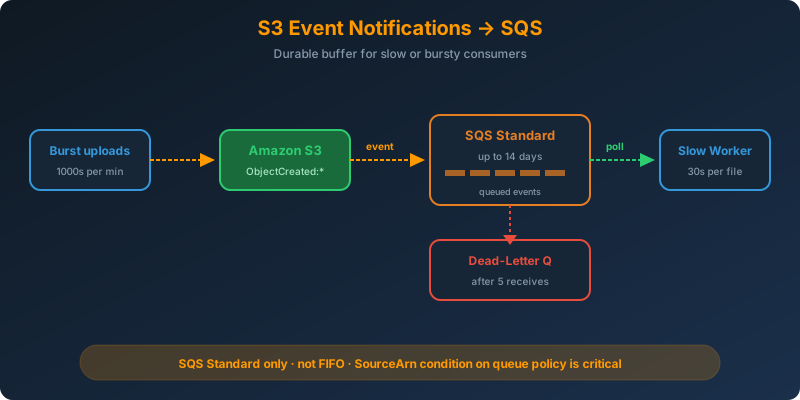
The Problem
Files arrive in your S3 bucket in bursts, thousands in a minute, then nothing for an hour. The consumer that processes each file needs 30 seconds per object and cannot scale to match the burst. If the consumer is down, you cannot afford to lose events.
The Solution
Send S3 event notifications to an SQS Standard queue. The queue absorbs the burst, holds events for up to 14 days, and lets your consumer poll at whatever rate it can handle. If the consumer dies, events wait in the queue until a worker returns.
How It Works
Why SQS Sits Between S3 and the Worker
Lambda works great for fast, event-driven work. When the consumer is slow, bursty, or expensive to scale, a queue is a better buffer:
- Durability — SQS retains messages for up to 14 days
- Backpressure — consumers pull at their own rate, no throttling logic needed
- Retry — a failed message returns to the queue after visibility timeout expires
- DLQ — poison messages land in a dead-letter queue for inspection
Configuring the Queue Policy
S3 needs permission to send to the queue. Attach this policy to the SQS queue:
1
2
3
4
5
6
7
8
9
10
11
12
13
{
  "Version": "2012-10-17",
  "Statement": [{
    "Effect": "Allow",
    "Principal": { "Service": "s3.amazonaws.com" },
    "Action": "sqs:SendMessage",
    "Resource": "arn:aws:sqs:eu-west-1:123456789012:uploads-queue",
    "Condition": {
      "ArnLike": { "aws:SourceArn": "arn:aws:s3:::uploads-hadzimahmutovic" },
      "StringEquals": { "aws:SourceAccount": "123456789012" }
    }
  }]
}
The aws:SourceArn condition blocks any bucket in any account from pushing to your queue.
Wiring the S3 Notification
1
2
3
4
5
6
7
8
9
aws s3api put-bucket-notification-configuration \
  --bucket uploads-hadzimahmutovic \
  --notification-configuration '{
    "QueueConfigurations": [{
      "Id": "queue-on-upload",
      "QueueArn": "arn:aws:sqs:eu-west-1:123456789012:uploads-queue",
      "Events": ["s3:ObjectCreated:*"]
    }]
  }'
Consumer Loop
1
2
3
4
5
6
7
8
9
10
11
12
13
14
15
16
17
18
19
20
21
22
23
24
25
import boto3
import json

sqs = boto3.client("sqs")
QUEUE_URL = "https://sqs.eu-west-1.amazonaws.com/123456789012/uploads-queue"

while True:
    resp = sqs.receive_message(
        QueueUrl=QUEUE_URL,
        MaxNumberOfMessages=10,
        WaitTimeSeconds=20,
        VisibilityTimeout=120
    )

    for msg in resp.get("Messages", []):
        body = json.loads(msg["Body"])
        for record in body.get("Records", []):
            bucket = record["s3"]["bucket"]["name"]
            key = record["s3"]["object"]["key"]
            process(bucket, key)

        sqs.delete_message(
            QueueUrl=QUEUE_URL,
            ReceiptHandle=msg["ReceiptHandle"]
        )
Delete the message only after process() succeeds. If it throws, the message reappears after the visibility timeout and another worker retries.
Standard vs FIFO
S3 event notifications only work with SQS Standard queues. FIFO queues are not supported as an S3 event destination. If you need strict ordering, you have to add an intermediate Lambda that forwards to FIFO. For most upload pipelines, Standard is fine because each event refers to a unique object.
Dead-Letter Queue
Attach a DLQ so poison messages do not spin forever:
1
2
3
4
5
aws sqs set-queue-attributes \
  --queue-url $QUEUE_URL \
  --attributes '{
    "RedrivePolicy": "{\"deadLetterTargetArn\":\"arn:aws:sqs:eu-west-1:123456789012:uploads-dlq\",\"maxReceiveCount\":\"5\"}"
  }'
After 5 failed receives, the message moves to uploads-dlq for manual review.
Why Not the Alternatives?
Direct S3 → Lambda — Lambda has concurrency limits and cannot buffer indefinitely. A downstream outage or a burst above the concurrency limit drops events after retries exhaust.
S3 → SNS → HTTP endpoint — SNS delivers at HTTP speed, no queueing. If your endpoint is slow or down, SNS retries with backoff and eventually gives up.
S3 → FIFO SQS directly — Not supported. S3 event notifications reject FIFO queue ARNs.
Polling S3 with ListObjectsV2 — Wasteful, slow, and you have to track what you already processed.
Key Takeaways
- SQS Standard is the durable buffer between S3 events and slow or bursty consumers
- FIFO queues are not supported as an S3 event destination
- Always add an
aws:SourceArncondition to the queue policy - Use a DLQ with
maxReceiveCountto isolate poison messages - Only delete the SQS message after processing succeeds



 Never miss a story from us, subscribe to our newsletter