
The Problem
You are uploading 10 GB backup archives into S3. Every single-stream PUT eventually stalls or drops halfway, and you start over from zero. You need a way to upload in parallel, resume from a failed part, and not pay for storage on abandoned attempts.
The Solution
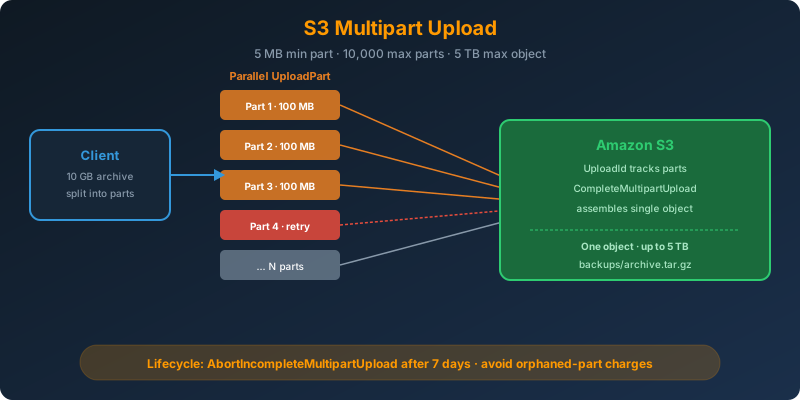
Use S3 Multipart Upload. Split the object into parts, upload the parts in parallel, and complete the upload with a single API call that assembles them into one object. Any single part can fail and be retried independently. Add a lifecycle rule to abort incomplete multipart uploads so failed attempts do not accumulate cost.
How It Works
The Limits
Know these numbers cold:
| Limit | Value |
|---|---|
| Minimum part size | 5 MB (except the last part) |
| Maximum part size | 5 GB |
| Maximum number of parts | 10,000 |
| Maximum object size | 5 TB |
| Multipart threshold (AWS recommendation) | Files > 100 MB |
Ten thousand parts times 5 GB gives you the 5 TB ceiling.
The Three-Step Flow
Multipart upload is three distinct API calls:
CreateMultipartUpload— returns anUploadIdUploadPart— one call per part, returns anETagper partCompleteMultipartUpload— supply the list ofPartNumber+ETagpairs; S3 stitches them into one object
If you need to bail out, call AbortMultipartUpload to release the parts.
The CLI Does It For You
For most workflows you never touch the low-level API. The CLI switches to multipart automatically:
1
2
3
4
5
aws configure set default.s3.multipart_threshold 100MB
aws configure set default.s3.multipart_chunksize 100MB
aws configure set default.s3.max_concurrent_requests 20

aws s3 cp backup-2026-07-25.tar.gz s3://backups/nightly/
Twenty parallel 100 MB parts saturates most uplinks.
Explicit Multipart With boto3
For code that needs to control the flow:
1
2
3
4
5
6
7
8
9
10
11
12
13
14
15
16
17
18
import boto3
from boto3.s3.transfer import TransferConfig

s3 = boto3.client("s3")

config = TransferConfig(
    multipart_threshold=100 * 1024 * 1024,
    multipart_chunksize=100 * 1024 * 1024,
    max_concurrency=20,
    use_threads=True
)

s3.upload_file(
    "backup-2026-07-25.tar.gz",
    "backups",
    "nightly/backup-2026-07-25.tar.gz",
    Config=config
)
Same behavior as the CLI, exposed as a library.
The Low-Level Flow When You Need It
For streaming producers where you cannot seek back to arbitrary bytes:
1
2
3
4
5
6
7
8
9
10
11
12
13
14
15
16
17
18
19
20
21
22
23
24
25
26
import boto3

s3 = boto3.client("s3")

mpu = s3.create_multipart_upload(Bucket="backups", Key="stream.bin")
upload_id = mpu["UploadId"]

parts = []
part_number = 1
for chunk in stream_chunks(min_size=5 * 1024 * 1024):
    response = s3.upload_part(
        Bucket="backups",
        Key="stream.bin",
        PartNumber=part_number,
        UploadId=upload_id,
        Body=chunk
    )
    parts.append({"PartNumber": part_number, "ETag": response["ETag"]})
    part_number += 1

s3.complete_multipart_upload(
    Bucket="backups",
    Key="stream.bin",
    UploadId=upload_id,
    MultipartUpload={"Parts": parts}
)
Do Not Forget the Cleanup Lifecycle Rule
Every failed or abandoned multipart upload leaves parts stored in S3 that you are billed for and cannot see in a regular ListObjects. Add this rule to every bucket:
1
2
3
4
5
6
7
8
9
10
{
  "Rules": [{
    "ID": "abort-incomplete-multipart",
    "Status": "Enabled",
    "Filter": {},
    "AbortIncompleteMultipartUpload": {
      "DaysAfterInitiation": 7
    }
  }]
}
1
2
3
aws s3api put-bucket-lifecycle-configuration \
  --bucket backups \
  --lifecycle-configuration file://cleanup.json
I speak from experience. A bucket without this rule accumulates gigabytes of orphaned parts you never realize you are paying for.
Listing In-Progress Uploads
1
aws s3api list-multipart-uploads --bucket backups
If you see anything older than a day that should not be there, abort it.
Multipart + Transfer Acceleration
For global uploads, combine multipart with Transfer Acceleration on the bucket. Each part goes to the nearest edge and rides the AWS backbone to the destination Region. The two features multiply.
Why Not the Alternatives?
Single-part PUT for a 10 GB file — Any dropped connection restarts from zero. S3 also has a 5 GB single-PUT hard limit, so anything above that requires multipart anyway.
Split the file into separate objects and reassemble later — You now have N objects to track, an application-side reassembly step, and no way to treat it as one S3 object. Multipart hides all that below the API.
AWS Snowball — Snowball is for offline transfer when bandwidth cannot deliver on time. 10 GB over decent internet is trivially fine.
S3 Transfer Acceleration alone — Speeds up the network path but does not give you resumability or parallelism. Multipart is what gives you both.
Key Takeaways
- Multipart upload: 5 MB minimum part, 10,000 max parts, 5 TB max object
- Any part can be retried independently — resilient to flaky networks
- Always add a lifecycle rule to abort incomplete uploads — otherwise you pay for hidden orphaned parts
- The CLI and boto3
TransferConfighandle multipart transparently; use the low-level API only for streaming producers - Combine with Transfer Acceleration for globally distributed uploads



 Never miss a story from us, subscribe to our newsletter