
The Problem
Your social media site lets users upload photos. During events, upload traffic spikes hard. You cannot let the application tier become the bottleneck for every byte of every uploaded file.
The Solution
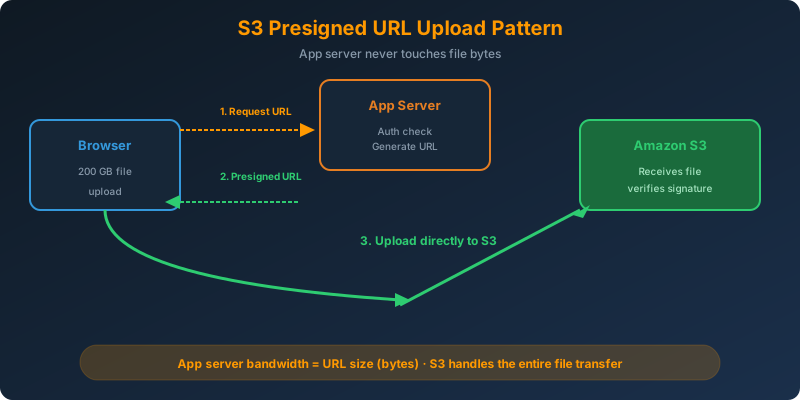
Generate an S3 presigned URL in the application. The browser then uploads directly to S3 using that URL. The app server never touches the file bytes.
How It Works
The Architecture
1
2
3
4
5
1. Browser → App server: "I want to upload photo.jpg"
2. App server: authenticates user, generates presigned URL
3. App server → Browser: presigned URL (few hundred bytes)
4. Browser → S3 directly: PUT the file using presigned URL
5. App server: receives webhook or checks S3 events for completion
The app server transfers a small URL. S3 transfers the actual file. This scales with S3’s near-infinite bandwidth, not your EC2 fleet.
Generating a Presigned URL (Python)
1
2
3
4
5
6
7
8
9
10
11
12
13
14
import boto3
from datetime import timedelta

s3 = boto3.client("s3")

url = s3.generate_presigned_url(
    ClientMethod="put_object",
    Params={
        "Bucket": "user-photos",
        "Key": f"uploads/{user_id}/{filename}",
        "ContentType": "image/jpeg"
    },
    ExpiresIn=300  # 5 minutes
)
The URL is signed with the application’s IAM credentials. When the browser uses it, S3 verifies the signature and allows the upload, but only for the parameters that were signed.
Uploading From the Browser
1
2
3
4
5
6
7
8
const response = await fetch("/api/get-upload-url", { method: "POST" });
const { url } = await response.json();

await fetch(url, {
  method: "PUT",
  headers: { "Content-Type": "image/jpeg" },
  body: fileBlob
});
That is the entire client. The file goes straight to S3.
Security Considerations
- Expiration — always keep short (5-15 min). Longer means more time for a leaked URL to be abused.
- Content-Type binding — sign the specific content type. Prevents uploading arbitrary files.
- Size limits — use presigned POST (not presigned PUT) if you need to enforce max size in the signature policy.
- Key naming — include user ID or a random UUID. Never let the client pick arbitrary keys.
Presigned URL vs Presigned POST
- Presigned URL (PUT) — simple, one file, size checked after upload
- Presigned POST — form-based, supports policy conditions like
["content-length-range", 0, 5000000]to enforce max file size
For strict validation, use presigned POST.
Why Not the Alternatives?
Upload through the app server, then transfer to S3 — App servers become the bottleneck. Every byte flows through them, consuming CPU, network bandwidth, and memory.
AWS Storage Gateway file gateway — Provides on-premises NFS/SMB access to S3. Not for browser uploads.
EFS as the upload target — EFS is an NFS-only VPC-internal file system. Browsers cannot mount it, and there is no HTTP interface.
Key Takeaways
- Presigned URLs offload uploads directly to S3 — the app server never touches the file bytes
- Keep expiration times short (5-15 minutes)
- Use presigned POST when you need policy-enforced size or content limits
- Never let the client control the S3 key name — inject user ID or a UUID
- This pattern also works for downloads (presigned URL with
get_object)



 Never miss a story from us, subscribe to our newsletter