
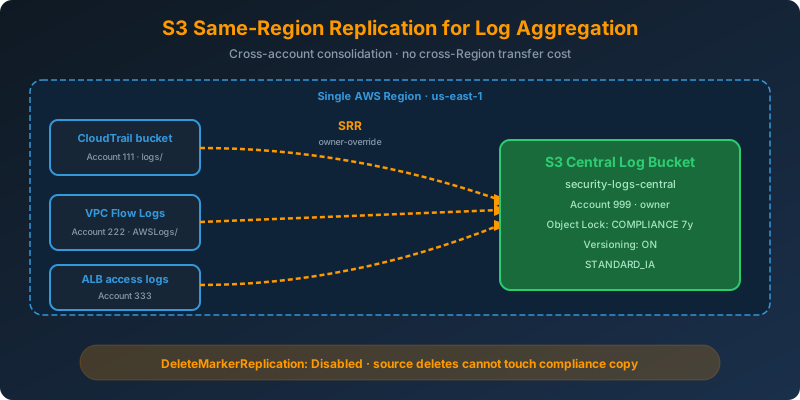
The Problem
You have dozens of accounts and services writing logs into separate S3 buckets: CloudTrail, VPC Flow Logs, ALB access logs, application logs. Auditors want a single, tamper-resistant bucket that contains every log object, and your security team wants to run analytics on it without touching the source buckets. Everything already lives in the same Region. You do not want to pay cross-Region transfer to consolidate.
The Solution
Use S3 Same-Region Replication (SRR) from each source bucket to a central log archive bucket in the same Region. Combine it with Object Lock in compliance mode on the destination for the immutable second copy. No cross-Region transfer, no manual ETL, and the destination stays in near real-time sync.
How It Works
SRR vs CRR
Same-Region Replication is architecturally identical to Cross-Region Replication: same API, same rule format, same versioning requirement. The only difference is that the destination bucket is in the same Region as the source. That has two consequences:
- No inter-Region data transfer charges — replication is free of transfer cost
- Not a DR strategy — a Regional outage takes both copies down
SRR shines for log aggregation, compliance copies, cross-account consolidation, and test-account population.
Central Log Bucket Setup
1
2
3
4
5
6
7
8
9
10
11
12
13
14
15
16
17
18
19
aws s3api create-bucket \
  --bucket security-logs-central \
  --region us-east-1

aws s3api put-bucket-versioning \
  --bucket security-logs-central \
  --versioning-configuration Status=Enabled

aws s3api put-object-lock-configuration \
  --bucket security-logs-central \
  --object-lock-configuration '{
    "ObjectLockEnabled": "Enabled",
    "Rule": {
      "DefaultRetention": {
        "Mode": "COMPLIANCE",
        "Years": 7
      }
    }
  }'
Object Lock must be enabled at bucket creation for new buckets. Plan this up front.
Cross-Account Bucket Policy on the Destination
Each source account needs permission to replicate into the central bucket:
1
2
3
4
5
6
7
8
9
10
11
12
13
14
15
16
17
18
19
20
21
22
{
  "Version": "2012-10-17",
  "Statement": [
    {
      "Sid": "AllowReplicationFromSourceAccounts",
      "Effect": "Allow",
      "Principal": {
        "AWS": [
          "arn:aws:iam::111111111111:role/S3ReplicationRole",
          "arn:aws:iam::222222222222:role/S3ReplicationRole"
        ]
      },
      "Action": [
        "s3:ReplicateObject",
        "s3:ReplicateDelete",
        "s3:ReplicateTags",
        "s3:ObjectOwnerOverrideToBucketOwner"
      ],
      "Resource": "arn:aws:s3:::security-logs-central/*"
    }
  ]
}
Replication Rule With Owner Override
By default, replicated objects retain their original owner, which for cross-account copies means the central-log account cannot fully manage them. Force the destination account to own every replicated object:
1
2
3
4
5
6
7
8
9
10
11
12
13
14
15
16
{
  "Role": "arn:aws:iam::111111111111:role/S3ReplicationRole",
  "Rules": [{
    "ID": "logs-to-central",
    "Status": "Enabled",
    "Priority": 1,
    "Filter": { "Prefix": "logs/" },
    "DeleteMarkerReplication": { "Status": "Disabled" },
    "Destination": {
      "Bucket": "arn:aws:s3:::security-logs-central",
      "Account": "999999999999",
      "AccessControlTranslation": { "Owner": "Destination" },
      "StorageClass": "STANDARD_IA"
    }
  }]
}
Two important pieces:
AccessControlTranslation— flips ownership to the destination accountDeleteMarkerReplication: Disabled— deletes in a source bucket must not remove the compliance copy
Prefix and Tag Filters
Multiple rules can target different prefixes. Route CloudTrail logs into one prefix, VPC Flow Logs into another, application logs into a third:
1
2
3
4
5
6
"Filter": {
  "And": {
    "Prefix": "AWSLogs/",
    "Tags": [{ "Key": "sensitivity", "Value": "audit" }]
  }
}
Monitoring Replication Lag
1
2
3
4
5
6
7
8
aws cloudwatch get-metric-statistics \
  --namespace AWS/S3 \
  --metric-name ReplicationLatency \
  --dimensions Name=SourceBucket,Value=cloudtrail-source Name=DestinationBucket,Value=security-logs-central \
  --start-time 2026-07-25T00:00:00Z \
  --end-time 2026-07-25T23:59:59Z \
  --period 300 \
  --statistics Average
Enable S3 Replication Metrics on the rule to get these. They cost extra but are the only way to alarm on lag.
Why Not the Alternatives?
CloudWatch Logs subscription filter to a central bucket — Works only for logs already flowing into CloudWatch Logs. Native S3-first log sources (VPC Flow Logs to S3, ALB access logs) do not go through CloudWatch Logs.
Lambda copy on s3:ObjectCreated event — You now operate the function, its IAM, its DLQ, its retries. SRR is native, has S3-managed retries, and includes ownership override built in.
Cross-Region Replication into the same Region — Not a thing. Replication is either same-Region or cross-Region; you cannot pretend a same-Region copy is DR.
Manual aws s3 sync from a cron — No ordering guarantees, no near-real-time delivery, and every scheduled run scans the entire prefix.
Key Takeaways
- SRR replicates objects within the same Region with no cross-Region transfer cost
- Use it for log aggregation, compliance copies, and cross-account consolidation
- Use
AccessControlTranslationso the destination account fully owns replicated objects - Combine with Object Lock in compliance mode for tamper-resistant audit copies
- SRR is not DR — for Regional failure protection, use CRR instead



 Never miss a story from us, subscribe to our newsletter