
The Problem
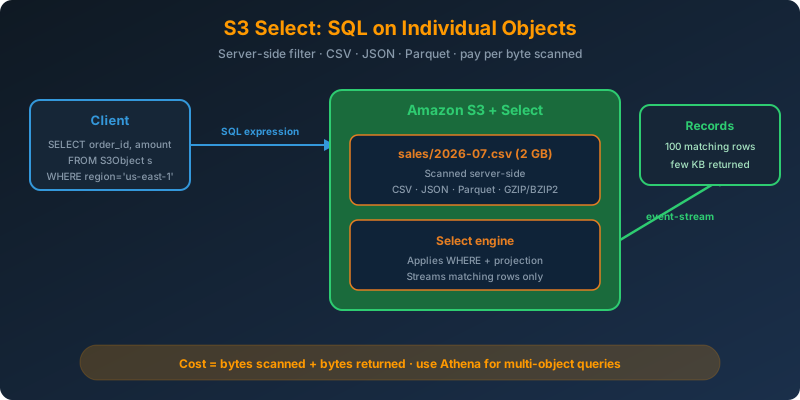
You have a 2 GB CSV in S3 and you need three columns for rows matching one predicate. Downloading the entire file to your EC2 instance to filter is wasteful: network, memory, and time all get burned reading bytes you throw away. You want the filter to happen server-side, on S3.
The Solution
Use S3 Select. Send a SQL SELECT statement and S3 runs it against the object, returning only the matching rows and columns. You pay for bytes scanned and bytes returned, which for a targeted query is a tiny fraction of the object size.
How It Works
Supported Formats
S3 Select works on individual objects in these formats:
- CSV (any delimiter, quoted or unquoted, with or without a header row)
- JSON — Lines format (one JSON document per line) or Document format
- Apache Parquet (columnar, so S3 only scans required columns)
The object can be uncompressed, GZIP-compressed, or BZIP2-compressed for CSV and JSON. Parquet uses its own compression internally.
A CSV Query From the CLI
Say sales/2026-07.csv looks like this:
1
2
3
4
order_id,region,amount,status
1001,us-east-1,42.00,shipped
1002,eu-west-1,120.50,pending
1003,us-east-1,15.75,cancelled
Ask for shipped US orders:
1
2
3
4
5
6
7
8
aws s3api select-object-content \
  --bucket sales-data \
  --key sales/2026-07.csv \
  --expression "SELECT order_id, amount FROM S3Object s WHERE s.region = 'us-east-1' AND s.status = 'shipped'" \
  --expression-type SQL \
  --input-serialization '{"CSV": {"FileHeaderInfo": "USE"}, "CompressionType": "NONE"}' \
  --output-serialization '{"CSV": {}}' \
  results.csv
Only the matching rows come back. The 2 GB file was scanned server-side; nothing else crossed the network.
The Same Query From boto3
1
2
3
4
5
6
7
8
9
10
11
12
13
14
15
16
import boto3

s3 = boto3.client("s3")

response = s3.select_object_content(
    Bucket="sales-data",
    Key="sales/2026-07.csv",
    ExpressionType="SQL",
    Expression="SELECT s.order_id, s.amount FROM S3Object s WHERE s.region = 'us-east-1'",
    InputSerialization={"CSV": {"FileHeaderInfo": "USE"}, "CompressionType": "NONE"},
    OutputSerialization={"CSV": {}}
)

for event in response["Payload"]:
    if "Records" in event:
        print(event["Records"]["Payload"].decode("utf-8"), end="")
The response is streamed in an event-stream, so records arrive as they are produced, not buffered in memory.
Querying JSON Lines
1
2
3
4
5
6
7
8
response = s3.select_object_content(
    Bucket="logs",
    Key="events/2026-07-25.jsonl.gz",
    ExpressionType="SQL",
    Expression="SELECT s.user_id, s.event FROM S3Object s WHERE s.status_code = 500",
    InputSerialization={"JSON": {"Type": "LINES"}, "CompressionType": "GZIP"},
    OutputSerialization={"JSON": {}}
)
GZIP is decompressed server-side. You never download the raw file.
Pricing
S3 Select charges two dimensions:
- Data scanned — how much of the object S3 read (Parquet lets you scan only relevant columns)
- Data returned — how much matched your query and was sent back to you
Standard S3 request charges also apply. For a well-shaped query on Parquet, the scan can be a small fraction of the file size. For a full-scan on CSV, it is the entire object.
Where S3 Select Is Not the Answer
S3 Select operates on one object at a time. If you need to query across thousands of objects, use Amazon Athena: it uses the same underlying engine, adds partitioning, and can scan an entire prefix with a single SQL statement. Rule of thumb:
- One or a few objects, simple filter → S3 Select
- Many objects, joins, aggregations → Athena
- Warehouse-scale, materialized views → Redshift Spectrum
S3 Select is not a scanning tool for security or data discovery across a bucket. For finding PII across millions of objects, use Amazon Macie.
Why Not the Alternatives?
Download the whole object and filter locally — Wastes network, memory, and CPU. On a 2 GB CSV returning 100 rows, you moved 20 million times more data than you needed.
Athena for a single-file lookup — Athena queries prefixes and partitions. For a one-off single-object filter, it is heavier than needed (though functionally correct).
S3 Object Lambda to transform on GET — Object Lambda runs a Lambda function on the response of a GetObject. Great for on-the-fly transformation, but if the goal is SQL filtering, S3 Select is the simpler primitive.
Load the file into RDS or Redshift to query — Now you have a copy of your data in another store, plus ingestion pipelines to maintain. S3 Select queries the object where it already lives.
Key Takeaways
- S3 Select runs SQL against a single object, returning only matching rows and columns
- Supports CSV, JSON (Lines and Document), and Parquet; CSV and JSON can be GZIP/BZIP2 compressed
- Pricing is data scanned + data returned. Parquet’s column pruning slashes the scan cost
- Use Athena when the query spans many objects or a whole prefix
- Response is a streamed event-stream. Records arrive incrementally, not as one blob



 Never miss a story from us, subscribe to our newsletter