
The Problem
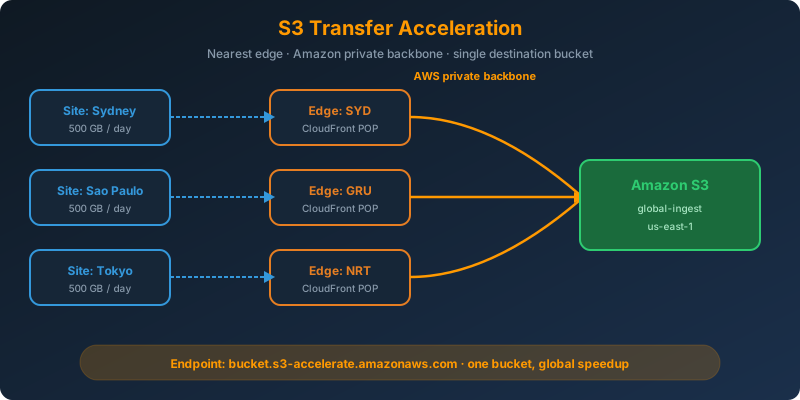
You collect 500 GB of data per day from cities on every continent, and every site must land in a single S3 bucket as fast as possible. The remote sites have decent internet, but the long haul across the public internet to one AWS Region is slow and unpredictable. You do not want to run replication topologies or ship Snowball devices for a workload the pipe can handle.
The Solution
Turn on S3 Transfer Acceleration on the destination bucket. Uploads then hit the nearest CloudFront edge location and travel to the bucket over Amazon’s private backbone instead of the public internet. Combine it with multipart upload for parallelism and the transfer completes in a fraction of the time.
How It Works
The Routing Change
Without Transfer Acceleration, a client in Sydney uploading to a bucket in us-east-1 traverses whatever internet path DNS and BGP hand it: congested peering, transoceanic hops, packet loss.
With Transfer Acceleration, the client uploads to a special endpoint:
1
<bucket-name>.s3-accelerate.amazonaws.com
DNS resolves that to the closest CloudFront edge. From the edge, the request rides Amazon’s private network to the destination Region. Fewer hops, less congestion, higher throughput.
Turning It On
1
2
3
aws s3api put-bucket-accelerate-configuration \
  --bucket global-ingest \
  --accelerate-configuration Status=Enabled
That is the entire server-side change. Give DNS a few minutes to propagate the accelerate endpoint.
Uploading Through the Accelerated Endpoint
The AWS CLI honors a per-bucket setting:
1
2
aws configure set default.s3.use_accelerate_endpoint true
aws s3 cp big-batch.tar.gz s3://global-ingest/site-42/
From boto3:
1
2
3
4
5
6
7
8
9
import boto3
from botocore.config import Config

s3 = boto3.client(
    "s3",
    config=Config(s3={"use_accelerate_endpoint": True})
)

s3.upload_file("big-batch.tar.gz", "global-ingest", "site-42/big-batch.tar.gz")
Combine With Multipart Upload
The CLI switches to multipart automatically for files above the multipart_threshold (8 MB default). You can push it further:
1
2
3
aws configure set default.s3.multipart_threshold 64MB
aws configure set default.s3.multipart_chunksize 64MB
aws configure set default.s3.max_concurrent_requests 20
Twenty parallel parts hitting a nearby edge saturates the local uplink better than a single serial stream to the origin Region.
The Speed Comparison Tool
AWS publishes a live comparison URL so you can quantify the difference from your own network before enabling:
1
https://s3-accelerate-speedtest.s3-accelerate.amazonaws.com/en/accelerate-speed-comparsion.html
Run it from a representative site. If the accelerated path shows meaningful gains, enable the feature.
Pricing Reality Check
Transfer Acceleration charges a per-GB uplift on top of standard data transfer (currently around $0.04/GB for transfers into US buckets from edges in the same continent, more for cross-continent hops). If the speed test shows no improvement for your Region pair, do not enable it. You would pay extra for no benefit.
Why Not the Alternatives?
Regional buckets with Cross-Region Replication back to a central bucket — You now operate multiple buckets, replication rules, IAM roles for replication, and cleanup logic. Transfer Acceleration is a single toggle on one bucket.
Snowball Edge devices shipped daily — Snowball is for offline transfers when the network cannot deliver in time. 500 GB per site over decent internet is well within accelerated upload capability. Snowball adds hardware logistics for no benefit here.
Global Accelerator pointed at S3 — Global Accelerator handles TCP/UDP traffic to application endpoints such as ALBs, NLBs, and EC2, not S3 uploads. Transfer Acceleration is the S3-native equivalent.
EC2 relays in each Region uploading to S3 — Introduces EC2 fleets to manage, EBS to size, and no real throughput advantage over direct accelerated PUT calls.
Key Takeaways
- S3 Transfer Acceleration routes uploads through the nearest CloudFront edge and Amazon’s private backbone
- Enable it with a single
put-bucket-accelerate-configurationAPI call - Combine with multipart upload and high concurrency for maximum throughput
- Use the AWS speed comparison tool before enabling — pay only if the path improves
- Do not confuse it with Global Accelerator (application traffic) or CRR (replication between buckets)



 Never miss a story from us, subscribe to our newsletter