
The Problem
Your critical data lives in an S3 bucket. Requirements:
- Protection against accidental deletion
- Permanent deletions must require additional authentication
The Solution
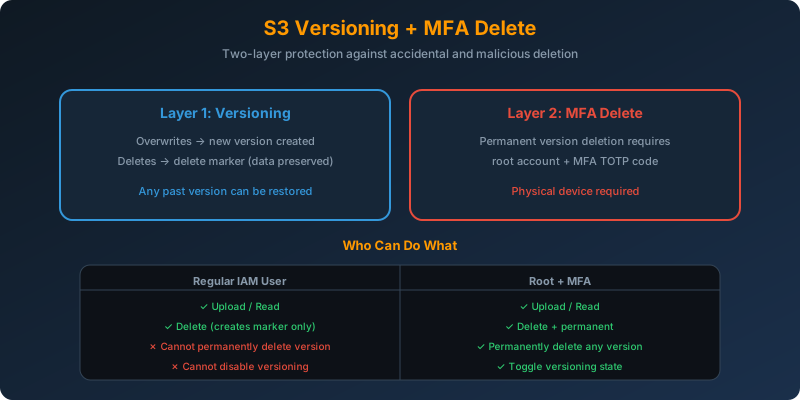
Two layers:
- S3 Versioning — every write creates a new version; delete creates a delete marker instead of removing data
- MFA Delete — requires an MFA code to permanently delete any version or disable versioning
How It Works
Step 1: Enable Versioning
1
2
3
aws s3api put-bucket-versioning \
  --bucket critical-data \
  --versioning-configuration Status=Enabled
After this:
- Overwriting an object creates a new version; old versions are retained
- Deleting an object creates a delete marker. The current version becomes a marker but no data is lost
- You can restore any previous version at any time
Step 2: Enable MFA Delete
This is only possible using the root account credentials via CLI (not the console):
1
2
3
4
aws s3api put-bucket-versioning \
  --bucket critical-data \
  --versioning-configuration 'Status=Enabled,MFADelete=Enabled' \
  --mfa "arn:aws:iam::123456789012:mfa/root-account-mfa-device 123456"
The --mfa parameter takes the MFA device ARN plus the current TOTP code.
What MFA Delete Requires
Once enabled, these operations need an MFA code:
- Permanently deleting a specific object version
- Suspending or re-enabling versioning
- Turning off MFA Delete itself
Normal operations (uploading, reading, creating delete markers) do not need MFA.
The Interaction Model
1
2
3
4
5
Regular user (no MFA) → can PUT, GET, "delete" (creates marker)
                     → CANNOT permanently delete a version
                     → CANNOT change versioning state

Root user with MFA   → can do everything, including permanent version deletion
Even if a rogue IAM user has full S3 permissions, they cannot permanently destroy your data without physical access to the root account’s MFA device.
Recovering “Deleted” Objects
When a delete marker is created:
1
2
3
4
5
6
7
8
# List versions to see the delete marker
aws s3api list-object-versions --bucket critical-data --prefix report.pdf

# Remove the delete marker to restore
aws s3api delete-object \
  --bucket critical-data \
  --key report.pdf \
  --version-id <delete-marker-version-id>
Why Not the Alternatives?
Versioning alone — Protects against accidental overwrites but not intentional permanent deletion. Any admin can delete-object --version-id and destroy history.
Lifecycle policy denying deletion — Lifecycle policies expire objects based on age; they do not deny actions.
Bucket policy denying all DeleteObject — This blocks deletion for everyone, including authorized users. Meets “prevent deletion” but breaks legitimate workflows. MFA Delete allows deletion with extra authentication instead of blocking it entirely.
Key Takeaways
- Versioning preserves every version; deletion creates a marker, not data loss
- MFA Delete requires the root account’s MFA code for permanent deletions
- MFA Delete can only be enabled by the root account via the CLI — not the console
- Combining both provides two-layer protection against both accidents and malicious deletion
- Consider also enabling Object Lock for regulatory scenarios requiring absolute WORM



 Never miss a story from us, subscribe to our newsletter