
The Problem
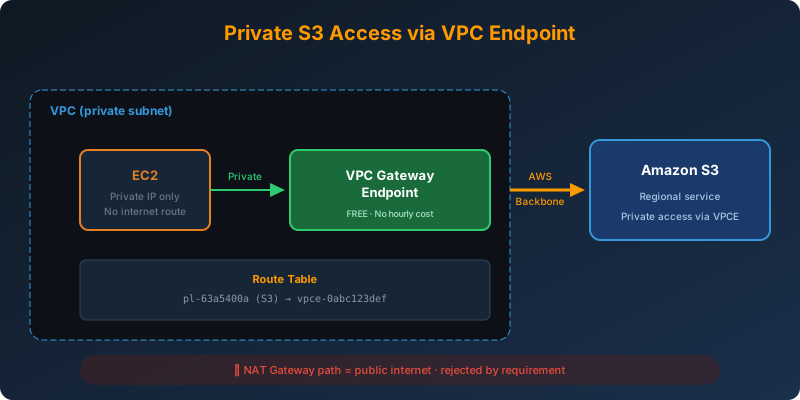
Your medical records application runs on EC2 in public subnets and accesses S3 over the internet. A new compliance requirement mandates that network traffic must take a private route and stay off the public internet.
The Solution
Move the EC2 instances to private subnets and create a VPC gateway endpoint for S3. All S3-bound traffic now flows through the AWS backbone; no internet gateway involved.
How It Works
Step 1: Create the Gateway Endpoint
1
2
3
4
5
aws ec2 create-vpc-endpoint \
  --vpc-id vpc-0123456789abcdef0 \
  --service-name com.amazonaws.us-east-1.s3 \
  --vpc-endpoint-type Gateway \
  --route-table-ids rtb-private-1 rtb-private-2
The gateway endpoint installs a prefix list route into the specified route tables. Any traffic destined for S3 (matching the prefix list) is routed through the endpoint instead of the internet gateway.
Step 2: Route Table Behavior
Before the endpoint:
1
0.0.0.0/0  →  igw-abcdef  (default route to internet)
After the endpoint:
1
2
0.0.0.0/0     →  igw-abcdef
pl-63a5400a   →  vpce-1234567890  (S3 prefix list → gateway endpoint)
The prefix list route is more specific, so it wins for S3 traffic. Everything else still uses the internet gateway (if present).
Step 3: Restrict the Endpoint (Optional but Recommended)
1
2
3
4
5
6
7
8
9
10
11
12
{
  "Statement": [{
    "Sid": "AllowSpecificBuckets",
    "Effect": "Allow",
    "Principal": "*",
    "Action": "s3:*",
    "Resource": [
      "arn:aws:s3:::medical-records",
      "arn:aws:s3:::medical-records/*"
    ]
  }]
}
Attaching this policy to the endpoint prevents even authenticated users from accessing arbitrary S3 buckets through this VPC.
Gateway vs Interface Endpoint for S3
| Feature | Gateway Endpoint | Interface Endpoint |
|---|---|---|
| Cost | Free | ~$0.01/hour per AZ + $0.01/GB |
| DNS | Prefix list in route table | Private DNS name |
| Access from on-premises | No | Yes (via Direct Connect/VPN) |
| Security groups | Not supported | Supported |
| Ideal for | VPC-only S3 access | Hybrid access from on-prem |
For pure EC2-to-S3 traffic, gateway endpoint is free and simpler.
Why Not the Alternatives?
NAT Gateway: Traffic still goes over the public internet through the NAT gateway’s public IP. Does not meet the “private route” requirement.
Security group restricting outbound to S3 prefix list: Security groups control what traffic is allowed, not what path it takes. Traffic still exits via the internet gateway.
Direct Connect for AWS-to-AWS traffic: Direct Connect connects on-premises networks to AWS. It is not for traffic between AWS services.
Key Takeaways
- Gateway endpoints for S3 and DynamoDB are free; always use them for VPC-based access
- The endpoint installs a prefix list route in your route table
- Move instances to private subnets to ensure they cannot bypass the endpoint via the internet gateway
- Attach an endpoint policy to restrict which buckets can be accessed through the endpoint
- Interface endpoints (PrivateLink) cost money but are needed for hybrid access from on-premises



 Never miss a story from us, subscribe to our newsletter