
The Problem
You let users upload profile pictures directly to S3 with a presigned URL. Two weeks in, someone uploads a 4 GB video as “avatar.jpg” and burns through your storage budget for the month.
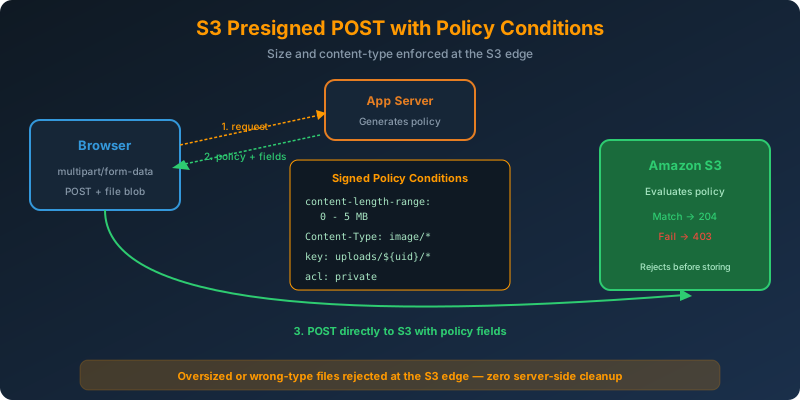
You need to reject oversized or wrong-type files at the S3 edge, not after the upload lands and your Lambda cleaner has to delete it.
The Solution
Switch from presigned PUT URLs to presigned POST URLs. Presigned POST supports a policy document with conditions that S3 evaluates before accepting the upload. You can enforce:
- Content-Length range: hard maximum size
- Content-Type prefix: only
image/*for example - Key naming pattern: exact prefixes or starts-with
- ACL: force
private
If any condition fails, S3 rejects with 403 and no bytes are stored.
How It Works
Presigned PUT vs Presigned POST
| Feature | Presigned PUT | Presigned POST |
|---|---|---|
| Interface | Single URL, HTTP PUT | HTML form, HTTP POST |
| Size enforcement | After the fact | Enforced by S3 |
| Content-Type binding | One exact value | Prefix match (image/) |
| Key patterns | Exact key only | Starts-with, exact, patterns |
| Client complexity | One fetch(PUT) |
Multipart form with fields |
| Browser upload progress | Native XHR | Native XHR |
Use Presigned POST for user-facing uploads. Presigned PUT is fine for trusted service-to-service transfers.
Generating a Presigned POST (Python)
1
2
3
4
5
6
7
8
9
10
11
12
13
14
15
16
17
18
19
20
21
import boto3

s3 = boto3.client("s3")

response = s3.generate_presigned_post(
    Bucket="user-avatars",
    Key="uploads/${filename}",
    Fields={
        "acl": "private",
        "Content-Type": "image/jpeg"
    },
    Conditions=[
        {"acl": "private"},
        ["starts-with", "$Content-Type", "image/"],
        ["content-length-range", 0, 5 * 1024 * 1024],  # 0 - 5 MB
        ["starts-with", "$key", "uploads/"]
    ],
    ExpiresIn=300
)

# response = { "url": "https://...", "fields": { key: value, ... } }
The content-length-range condition sets the size cap. S3 refuses any upload whose actual byte count falls outside 0 - 5 MB.
The Client-Side Upload Form
1
2
3
4
5
6
7
<form action="{{ response.url }}" method="POST" enctype="multipart/form-data">
  {% for k, v in response.fields.items() %}
    <input type="hidden" name="{{ k }}" value="{{ v }}">
  {% endfor %}
  <input type="file" name="file">
  <button type="submit">Upload</button>
</form>
All the signed fields (policy, signature, key, algorithm, credential) go in as hidden inputs. The file field must come last. S3 stops reading multipart data once it hits the file boundary, so any signed field after it will be ignored.
Uploading From JavaScript
1
2
3
4
5
6
7
8
9
10
const { url, fields } = await (await fetch("/api/presigned-post")).json();

const formData = new FormData();
Object.entries(fields).forEach(([k, v]) => formData.append(k, v));
formData.append("file", fileBlob);

const res = await fetch(url, { method: "POST", body: formData });
if (res.status !== 204) {
  throw new Error("Upload rejected by S3 policy");
}
S3 returns 204 No Content on success. On policy violation, you get a 403 with an XML body explaining which condition failed.
Common Conditions
["content-length-range", 0, 5242880]: file size 0 to 5 MB["starts-with", "$Content-Type", "image/"]: any image MIME type{"success_action_status": "201"}: S3 returns 201 with an XML response body["starts-with", "$key", "uploads/${user_id}/"]: enforce user-scoped keys
Watch the Expiration
The policy embeds an expiration timestamp. Keep it short: 5 to 15 minutes. A stolen presigned POST is only useful until the clock runs out.
Why Not the Alternatives?
Presigned PUT: Simpler, but has no way to enforce max file size in the signature. You would have to accept the upload, check the size after, and delete oversized objects. Pointless bandwidth waste.
Server-side upload proxy: Puts every byte through your app tier, defeating the whole reason to use presigned uploads.
S3 event → Lambda cleanup: Reactive, wasteful, and by the time Lambda runs the object already cost you PUT charges and storage. Prevention beats cleanup.
Client-side JavaScript size check: Trivially bypassed with curl or a modified script. Never trust client-side validation for security or cost controls.
Key Takeaways
- Presigned POST enforces size, content-type, and key patterns at the S3 edge
- Use
content-length-rangeto hard-cap file size. S3 rejects oversized uploads before storing them - The
filefield must be the last form field in the multipart payload - S3 returns 204 No Content on success,
403with details on policy failure - Keep expiration short (5-15 min) and always scope the key prefix to the user or session



 Never miss a story from us, subscribe to our newsletter