
The Problem
Your compliance and DR policy requires that every object written to your primary bucket is available in a second region within 15 minutes. You need this in writing: a contractual guarantee, not “usually fast.”
Standard Cross-Region Replication (CRR) is best-effort. Objects usually copy within minutes, but on a bad day it can be hours. That is not what you can put in front of an auditor.
The Solution
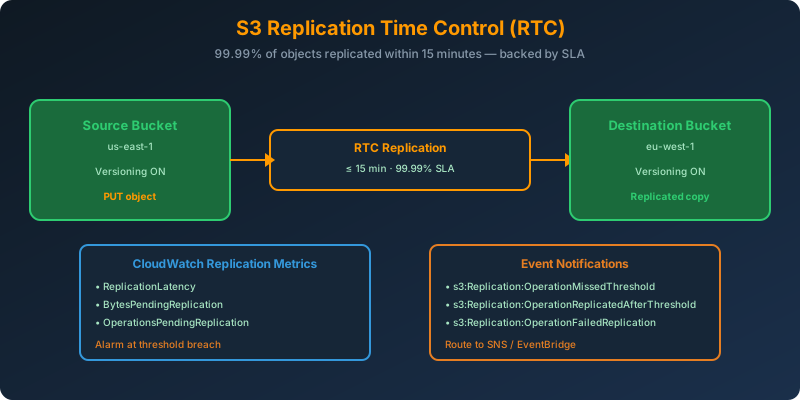
Enable S3 Replication Time Control (RTC) on your replication rule. RTC replicates 99.99% of new objects within 15 minutes, backed by an actual AWS Service Level Agreement. It also enables S3 Replication Metrics so you can alarm on any object that misses the window.
How It Works
What RTC Guarantees
- 99.99% of objects replicated within 15 minutes: measured monthly, backed by an SLA with service credits
- The other 0.01% must still complete, most in a matter of seconds beyond the window
- Metrics automatically published to CloudWatch:
ReplicationLatency,BytesPendingReplication,OperationsPendingReplication - Event notifications when objects miss the 15-minute threshold
Enabling RTC on a Replication Rule
RTC is a property of the destination configuration inside a replication rule. Both source and destination buckets need versioning enabled.
1
2
3
4
5
6
7
8
9
10
11
12
13
14
15
16
17
18
19
20
21
22
23
aws s3api put-bucket-replication \
  --bucket source-us-east-1 \
  --replication-configuration '{
    "Role": "arn:aws:iam::111122223333:role/S3ReplicationRole",
    "Rules": [{
      "ID": "rtc-to-eu-west-1",
      "Status": "Enabled",
      "Priority": 1,
      "DeleteMarkerReplication": { "Status": "Disabled" },
      "Filter": {},
      "Destination": {
        "Bucket": "arn:aws:s3:::destination-eu-west-1",
        "ReplicationTime": {
          "Status": "Enabled",
          "Time": { "Minutes": 15 }
        },
        "Metrics": {
          "Status": "Enabled",
          "EventThreshold": { "Minutes": 15 }
        }
      }
    }]
  }'
The two blocks that matter:
ReplicationTime: turns RTC on with the 15-minute SLAMetrics: publishes replication metrics and fires events at the threshold
Alarming on Missed Replication
Create a CloudWatch alarm on s3:Replication:OperationMissedThreshold:
1
2
3
4
5
6
7
8
9
10
aws cloudwatch put-metric-alarm \
  --alarm-name s3-rtc-missed-threshold \
  --metric-name OperationsPendingReplication \
  --namespace AWS/S3 \
  --statistic Maximum \
  --period 60 \
  --evaluation-periods 3 \
  --threshold 0 \
  --comparison-operator GreaterThanThreshold \
  --dimensions Name=SourceBucket,Value=source-us-east-1 Name=DestinationBucket,Value=destination-eu-west-1
Any object pending beyond 15 minutes triggers the alarm. Wire it to SNS and route to your on-call.
The Cost of RTC
RTC is not free. You pay:
- Standard replication charges (PUT requests, storage in destination, inter-region data transfer)
- RTC data transfer fee: a per-GB premium on top of standard inter-region transfer
- Replication Metrics: priced like CloudWatch custom metrics
For a compliance workload where the SLA is the point, this is worth it. For a bulk backup with loose timing, standard CRR is fine.
RTC vs Standard Replication
| Feature | Standard CRR/SRR | RTC |
|---|---|---|
| SLA on time | None | 99.99% within 15 min |
| CloudWatch metrics | Optional | Included |
| Event notifications | No | Yes (missed threshold) |
| Additional cost | None extra | Per-GB RTC fee |
| Use case | Backup, analytics | Compliance, DR RPO |
Prerequisites
- Versioning enabled on both source and destination buckets
- IAM role with
s3:Replicate*permissions - Destination in a different region (RTC also works with same-region replication)
- Objects existing before the rule was created are not replicated unless you run a batch replication job
Why Not the Alternatives?
Standard Cross-Region Replication: Usually fast, but no SLA. Cannot satisfy a “within 15 minutes” contractual requirement.
S3 Batch Replication: Great for one-time backfills of existing objects. Not for ongoing streaming replication with tight timing.
Custom Lambda-based copy via S3 events: Fragile, requires DLQs, retries, monitoring, and still gives you no AWS SLA.
AWS DataSync between buckets: Scheduled or on-demand, not continuous. Wrong tool for streaming replication.
Key Takeaways
- S3 RTC replicates 99.99% of objects within 15 minutes, backed by an AWS SLA with service credits
- Enable via the
ReplicationTimeandMetricsblocks in the destination configuration - Replication Metrics publish to CloudWatch. Alarm on
OperationsPendingReplication - Both source and destination buckets need versioning enabled
- Pay the RTC premium only where the SLA is required. Standard CRR is fine for bulk backup



 Never miss a story from us, subscribe to our newsletter