
The Problem
You have a shared S3 bucket holding data used by twelve different applications and teams. Each needs a different slice, with different permissions, and some must only be reachable from inside a VPC.
The bucket policy has grown to hundreds of lines of nested conditions. Every change risks breaking three other apps. You cannot ship a new team’s permissions without a code review from five stakeholders.
The Solution
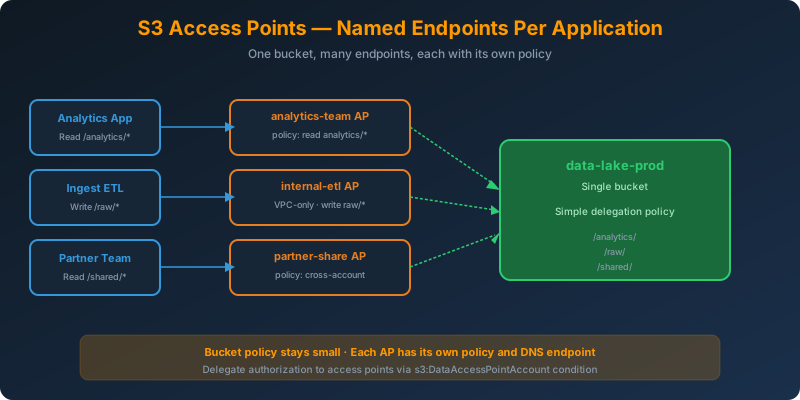
Create S3 Access Points. Each access point is a named endpoint attached to a bucket with its own policy and its own network scope. Instead of one giant bucket policy, you get one small, focused access point policy per application.
How It Works
The Model
An access point sits in front of a bucket and enforces its own IAM-style policy. Each access point has:
- A unique DNS name (
my-ap-123456789012.s3-accesspoint.us-east-1.amazonaws.com) - Its own access policy
- An optional VPC-only restriction (only requests from a specific VPC succeed)
- A network origin setting (Internet or VPC)
The bucket policy stays simple. All the application-specific rules move into access point policies.
Creating an Access Point
1
2
3
4
aws s3control create-access-point \
  --account-id 111122223333 \
  --name analytics-team \
  --bucket data-lake-prod
Attach a scoped policy:
1
2
3
4
5
6
7
8
9
10
11
12
13
14
15
aws s3control put-access-point-policy \
  --account-id 111122223333 \
  --name analytics-team \
  --policy '{
    "Version": "2012-10-17",
    "Statement": [{
      "Effect": "Allow",
      "Principal": { "AWS": "arn:aws:iam::111122223333:role/AnalyticsRole" },
      "Action": ["s3:GetObject", "s3:ListBucket"],
      "Resource": [
        "arn:aws:s3:us-east-1:111122223333:accesspoint/analytics-team",
        "arn:aws:s3:us-east-1:111122223333:accesspoint/analytics-team/object/analytics/*"
      ]
    }]
  }'
The AnalyticsRole now has read-only access to the analytics/ prefix, via the access point only.
VPC-Only Access Points
Lock an access point to a single VPC:
1
2
3
4
5
aws s3control create-access-point \
  --account-id 111122223333 \
  --name internal-etl \
  --bucket data-lake-prod \
  --vpc-configuration VpcId=vpc-0abc123def456
Any request that does not originate from vpc-0abc123def456 returns 403. Combine with an S3 gateway VPC endpoint and traffic never leaves AWS’s private network.
Using an Access Point From an SDK
The ARN can be passed anywhere a bucket name would go:
1
2
3
4
5
6
7
8
import boto3

s3 = boto3.client("s3")

resp = s3.get_object(
    Bucket="arn:aws:s3:us-east-1:111122223333:accesspoint/analytics-team",
    Key="analytics/report-2026-Q3.parquet"
)
No new SDK code. The client resolves the access point ARN transparently.
Delegating Cross-Account Access
Access points also solve the cross-account “give me a slice” problem. Owner grants permission via the access point policy. No need to touch the bucket policy for every new consumer account.
The bucket policy needs a single delegation clause allowing access points in the owning account to authorize:
1
2
3
4
5
6
7
8
9
10
11
12
13
14
{
  "Effect": "Allow",
  "Principal": { "AWS": "*" },
  "Action": "*",
  "Resource": [
    "arn:aws:s3:::data-lake-prod",
    "arn:aws:s3:::data-lake-prod/*"
  ],
  "Condition": {
    "StringEquals": {
      "s3:DataAccessPointAccount": "111122223333"
    }
  }
}
Everything else is delegated to per-application access point policies.
Why Not the Alternatives?
Keep piling into one bucket policy: Hits the 20 KB policy size limit, becomes unauditable, one bad edit breaks every consumer.
One bucket per application: Fragments the data, breaks lifecycle management, blows up your bucket-count quota (100 soft limit, 1,000 hard limit per account).
Presigned URLs for everything: Great for temporary access, wrong for long-lived application permissions. You would need to rebuild an auth service to generate them.
IAM policies alone: Works for internal accounts, but does not give you a per-app named endpoint or a way to enforce VPC-only access at the object layer.
Key Takeaways
- S3 Access Points are named endpoints in front of a bucket, each with its own policy
- Each application or team gets a dedicated endpoint — bucket policies stay small
- VPC-only access points restrict traffic to a specific VPC — great for internal ETL and analytics
- Reference an access point by ARN in any SDK call where you would use a bucket name
- The bucket policy needs a single delegation clause to hand authorization off to access points



 Never miss a story from us, subscribe to our newsletter