
The Problem
Users upload photos to your S3 bucket, and every one of them needs a thumbnail, a watermark, and a WebP variant. You do not want to poll the bucket. You do not want a batch job that runs overnight. You want the processing to happen the second the file lands.
The Solution
Attach an S3 event notification to the bucket and point it at a Lambda function. S3 invokes Lambda directly for every s3:ObjectCreated:* event, and Lambda processes the file within seconds, with no infrastructure to manage.
How It Works
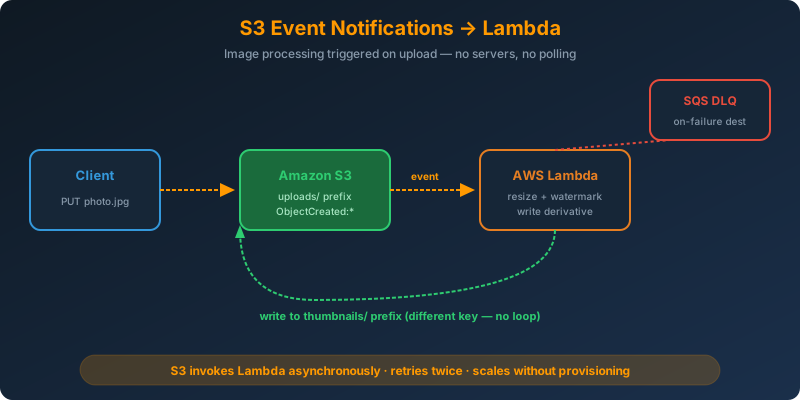
The Flow
- The client uploads
photo.jpgtos3://uploads/ - S3 emits an
ObjectCreated:Putevent - S3 invokes the Lambda function with a JSON payload describing the object
- Lambda downloads the object, transforms it, writes derivatives back to S3
Lambda is the synchronous destination in this pattern. If the function throws, S3 retries a couple of times and then optionally sends the event to a dead-letter destination.
Configuring the Notification
Give the Lambda function permission to be invoked by your bucket first:
1
2
3
4
5
6
7
aws lambda add-permission \
  --function-name process-image \
  --statement-id s3-invoke \
  --action lambda:InvokeFunction \
  --principal s3.amazonaws.com \
  --source-arn arn:aws:s3:::uploads-hadzimahmutovic \
  --source-account 123456789012
Then attach the notification to the bucket:
1
2
3
4
5
6
7
8
9
10
11
12
13
14
15
aws s3api put-bucket-notification-configuration \
  --bucket uploads-hadzimahmutovic \
  --notification-configuration '{
    "LambdaFunctionConfigurations": [{
      "Id": "process-on-upload",
      "LambdaFunctionArn": "arn:aws:lambda:eu-west-1:123456789012:function:process-image",
      "Events": ["s3:ObjectCreated:*"],
      "Filter": {
        "Key": { "FilterRules": [
          { "Name": "prefix", "Value": "uploads/" },
          { "Name": "suffix", "Value": ".jpg" }
        ] }
      }
    }]
  }'
The prefix and suffix filters keep the function from firing on every object in the bucket. Only .jpg files under uploads/ reach the function.
The Lambda Handler
1
2
3
4
5
6
7
8
9
10
11
12
13
14
15
16
17
18
19
20
21
22
23
24
25
import boto3
from PIL import Image
import io

s3 = boto3.client("s3")

def handler(event, context):
    for record in event["Records"]:
        bucket = record["s3"]["bucket"]["name"]
        key = record["s3"]["object"]["key"]

        obj = s3.get_object(Bucket=bucket, Key=key)
        img = Image.open(obj["Body"])
        img.thumbnail((320, 320))

        buf = io.BytesIO()
        img.save(buf, format="WEBP", quality=80)
        buf.seek(0)

        s3.put_object(
            Bucket=bucket,
            Key=f"thumbnails/{key.split('/')[-1].rsplit('.', 1)[0]}.webp",
            Body=buf,
            ContentType="image/webp"
        )
Write derivatives to a different prefix than the source. Writing back into
uploads/re-triggers the function and creates an infinite loop that bills you until you notice.
Retries and Failures
S3 invokes Lambda asynchronously. Failed invocations are retried twice by default. Configure an on-failure destination (SQS, SNS, or EventBridge) so you can inspect stuck events:
1
2
3
4
5
6
aws lambda put-function-event-invoke-config \
  --function-name process-image \
  --maximum-retry-attempts 2 \
  --destination-config '{
    "OnFailure": { "Destination": "arn:aws:sqs:eu-west-1:123456789012:image-dlq" }
  }'
Why Not the Alternatives?
Scheduled Lambda that polls the bucket — Latency depends on the schedule. Every run costs a ListObjects call. You have to track which objects you already processed.
S3 event notification to SQS with a worker fleet — Adds a queue and consumers you must manage. Fine for slow work, but Lambda handles image transforms in seconds and needs no infrastructure.
EventBridge rule on CloudTrail data events — Works, but data events cost money and add latency. Native S3 event notifications are free and faster.
Application polling from EC2 — You are back to running servers, paying for idle time, and building your own scaler.
Key Takeaways
- S3 event notifications to Lambda are the shortest path from upload to processing
- Add prefix and suffix filters so the function only fires on the objects you care about
- Never write derivatives back to the same prefix, or you will trigger an infinite loop
- Configure an on-failure destination so you can debug retries that exhausted
- Lambda scales to thousands of concurrent invocations without any provisioning



 Never miss a story from us, subscribe to our newsletter