
The Problem
An image hosting company uploads large assets to S3 Standard using parallel multipart uploads and overwrites duplicates. The access pattern is:
- First 30 days: frequent access
- After 30 days: inconsistent, unpredictable access
The company wants to optimize costs while maintaining high availability and multi-AZ resilience.
The Solution
Two complementary optimizations:
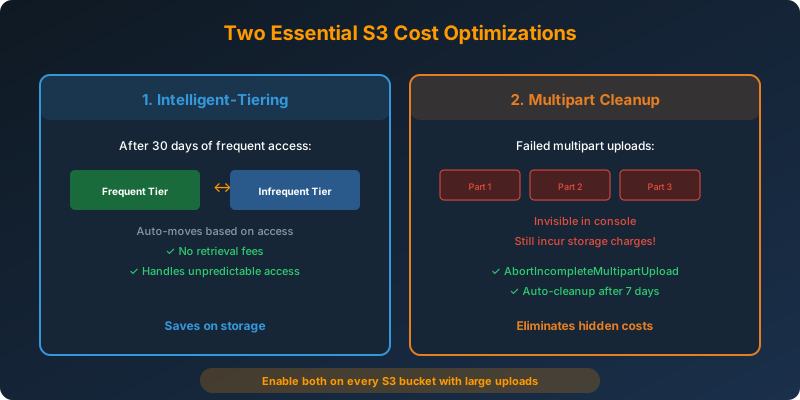
- Move assets to S3 Intelligent-Tiering after 30 days to handle unpredictable access patterns automatically
- Configure a lifecycle policy to clean up incomplete multipart uploads to eliminate hidden storage costs from failed uploads
How It Works
Optimization 1: Intelligent-Tiering After 30 Days
1
2
3
4
5
6
7
8
9
10
11
12
13
14
15
16
17
aws s3api put-bucket-lifecycle-configuration \
  --bucket image-hosting-bucket \
  --lifecycle-configuration '{
    "Rules": [
      {
        "ID": "MoveToIntelligentTiering",
        "Status": "Enabled",
        "Filter": {},
        "Transitions": [
          {
            "Days": 30,
            "StorageClass": "INTELLIGENT_TIERING"
          }
        ]
      }
    ]
  }'
After 30 days of frequent access in S3 Standard, objects move to Intelligent-Tiering. Since access patterns are inconsistent after 30 days, Intelligent-Tiering automatically moves each object to the most cost-effective tier based on its individual access frequency. No retrieval fees apply when objects move between tiers.
Optimization 2: Multipart Upload Cleanup
1
2
3
4
5
6
7
8
9
10
11
12
13
14
aws s3api put-bucket-lifecycle-configuration \
  --bucket image-hosting-bucket \
  --lifecycle-configuration '{
    "Rules": [
      {
        "ID": "CleanupIncompleteUploads",
        "Status": "Enabled",
        "Filter": {},
        "AbortIncompleteMultipartUpload": {
          "DaysAfterInitiation": 7
        }
      }
    ]
  }'
Why Multipart Cleanup Matters
When you use multipart upload, each part is stored as a separate object in S3. If the upload fails or is never completed:
- The parts remain in the bucket
- They are not visible in the S3 console or
list-objectsoutput - They still incur storage charges
- They accumulate silently over time
In applications with high upload volumes and occasional failures, incomplete uploads accumulate hidden storage charges.
How to Check for Incomplete Uploads
1
aws s3api list-multipart-uploads --bucket image-hosting-bucket
Why Not the Alternatives?
S3 Standard-IA after 30 days: Standard-IA charges retrieval fees. With inconsistent access patterns, a suddenly popular image would accumulate retrieval charges. Intelligent-Tiering has no retrieval fees when objects move between tiers.
S3 One Zone-IA after 30 days: Stores data in a single AZ. Does not meet the high availability and multi-AZ resilience requirement.
Clean up expired object delete markers: This lifecycle rule only applies to buckets with versioning enabled. The question describes overwrites (not versioned updates), so this rule is irrelevant.
Key Takeaways
- Incomplete multipart uploads are invisible storage costs. Always configure cleanup lifecycle rules
- Use S3 Intelligent-Tiering when access patterns are inconsistent or unpredictable
- S3 Standard-IA charges retrieval fees; Intelligent-Tiering does not
- S3 One Zone-IA fails any “high availability” or “multi-AZ resilience” requirement
- These two optimizations (Intelligent-Tiering + multipart cleanup) should be standard practice on any S3 bucket with large uploads



 Never miss a story from us, subscribe to our newsletter