
The Problem
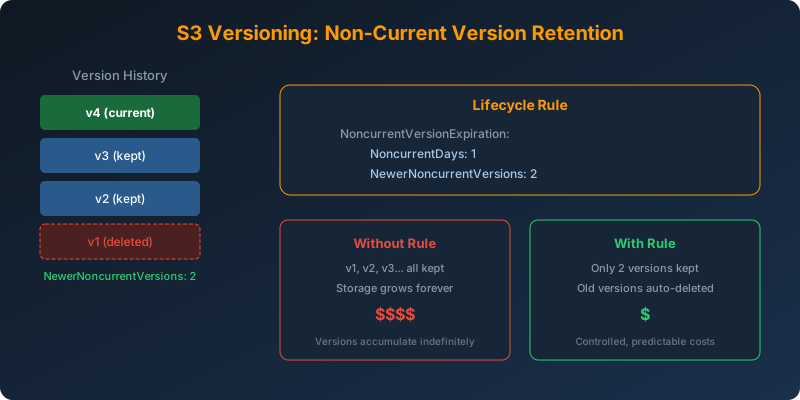
You store high-resolution pictures in S3 with versioning enabled. Each update creates a new version, and old versions pile up. You only need the two most recent versions of each object. Your S3 bill keeps growing because every previous version is still stored at full cost.
The Solution
Use an S3 lifecycle rule with NoncurrentVersionExpiration to automatically delete old versions while retaining the two most recent.
How It Works
When versioning is enabled on an S3 bucket, every overwrite creates a new “current” version and the previous version becomes “noncurrent.” Without a lifecycle rule, noncurrent versions are kept forever.
Configure the Lifecycle Rule
1
2
3
4
5
6
7
8
9
10
11
12
13
14
15
aws s3api put-bucket-lifecycle-configuration \
  --bucket my-pictures-bucket \
  --lifecycle-configuration '{
    "Rules": [
      {
        "ID": "RetainTwoVersions",
        "Status": "Enabled",
        "Filter": {},
        "NoncurrentVersionExpiration": {
          "NoncurrentDays": 1,
          "NewerNoncurrentVersions": 2
        }
      }
    ]
  }'
What This Does
NewerNoncurrentVersions: 2— keeps the 2 most recent noncurrent versionsNoncurrentDays: 1— deletes excess noncurrent versions after 1 day- The current version is never affected by this rule
Version Flow Example
1
2
3
4
Upload v1 → v1 is current
Upload v2 → v2 is current, v1 becomes noncurrent
Upload v3 → v3 is current, v2 and v1 are noncurrent (both retained)
Upload v4 → v4 is current, v3 and v2 are noncurrent (retained), v1 is deleted
Why Not the Alternatives?
Lambda function to check and delete old versions — This is a custom solution that requires writing code, managing execution permissions, scheduling runs, and handling errors. S3 lifecycle rules are a native, fully managed feature that runs continuously with zero operational overhead.
S3 Batch Operations — Handles one-time, large-scale operations. It is not suitable for continuous, automated lifecycle management. You would need to manually trigger it periodically.
Deactivate versioning — Suspending versioning stops creating new versions but does not delete existing noncurrent versions. You cannot selectively retain a specific number of versions this way.
Key Takeaways
- S3 lifecycle rules support
NewerNoncurrentVersionsto retain a specific number of noncurrent versions - This is a zero-code, zero-maintenance solution. The policy runs automatically
- Without a noncurrent version lifecycle rule, old versions accumulate indefinitely and drive up costs
- Make sure to set both
NoncurrentDaysandNewerNoncurrentVersionsfor precise control - This is separate from current version expiration. You can combine both in the same lifecycle configuration



 Never miss a story from us, subscribe to our newsletter