
The Problem
You store CloudTrail logs in an S3 bucket with versioning enabled. Your lifecycle policy deletes current objects after 3 years. After the fourth year, the bucket metrics show the object count continues to rise even though new log delivery is consistent. Something is wrong.
The Solution
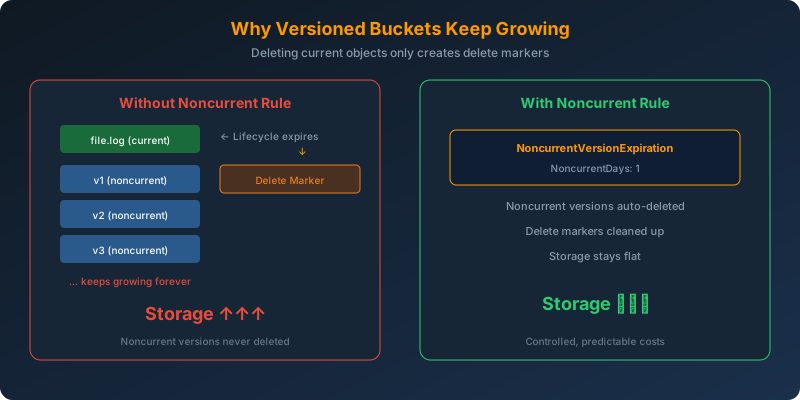
The lifecycle policy only targets current versions. In a versioned bucket, deleting a current object creates a delete marker and the previous version becomes a noncurrent version that is never cleaned up. You need to add a lifecycle rule that also expires noncurrent versions.
1
2
3
4
5
6
7
8
9
10
11
12
13
14
15
16
17
18
19
20
21
22
23
24
25
26
27
28
29
30
aws s3api put-bucket-lifecycle-configuration \
  --bucket cloudtrail-logs-bucket \
  --lifecycle-configuration '{
    "Rules": [
      {
        "ID": "ExpireCurrentVersions",
        "Status": "Enabled",
        "Filter": {},
        "Expiration": {
          "Days": 1095
        }
      },
      {
        "ID": "ExpireNoncurrentVersions",
        "Status": "Enabled",
        "Filter": {},
        "NoncurrentVersionExpiration": {
          "NoncurrentDays": 1
        }
      },
      {
        "ID": "CleanupDeleteMarkers",
        "Status": "Enabled",
        "Filter": {},
        "Expiration": {
          "ExpiredObjectDeleteMarker": true
        }
      }
    ]
  }'
How It Works
The Versioning Lifecycle
When S3 versioning is enabled:
- Upload object → Creates version v1 (current)
- Overwrite object → v2 becomes current, v1 becomes noncurrent
- Delete object → Creates a delete marker (becomes “current”), v2 becomes noncurrent
- Lifecycle expires current after 3 years → Delete marker created, but noncurrent versions persist
This is why the bucket keeps growing. Every “deletion” by the lifecycle creates a delete marker, and the actual data (noncurrent versions) accumulates indefinitely.
The Fix: Three Lifecycle Rules
| Rule | What It Does |
|---|---|
Expiration.Days: 1095 |
Creates delete markers for current objects after 3 years |
NoncurrentVersionExpiration.NoncurrentDays: 1 |
Permanently deletes noncurrent versions after 1 day |
Expiration.ExpiredObjectDeleteMarker: true |
Cleans up orphaned delete markers |
Why Not the Alternatives?
CloudTrail expiration setting — CloudTrail delivers logs to a destination. It has no feature to manage lifecycle or expiration of delivered files. Lifecycle management happens at the S3 bucket level.
Lambda function to enumerate and delete old objects — This is custom code that must be written, deployed, maintained, and monitored. S3 lifecycle policies are a native feature that handles this automatically at no additional cost.
Change S3 Object Ownership — Object Ownership controls cross-account permissions. It has no effect on lifecycle or deletion behavior.
Key Takeaways
- In versioned buckets, deleting a current object only creates a delete marker — the actual data persists as a noncurrent version
- Lifecycle policies must explicitly target noncurrent versions to permanently remove old data
- Use
NoncurrentVersionExpirationto clean up old versions - Use
ExpiredObjectDeleteMarkerto remove orphaned delete markers - When diagnosing unexpected storage growth, check whether versioning is enabled — deletion of current objects leaves noncurrent versions behind



 Never miss a story from us, subscribe to our newsletter