
The Problem
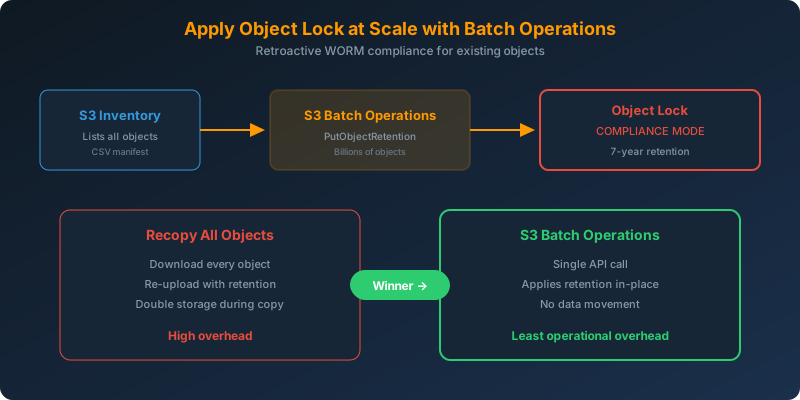
You have PDF data stored in S3. A new legal requirement mandates that all data (both new and existing) must be retained for 7 years with WORM (Write Once Read Many) protection. You need to apply this to potentially millions of existing objects with the least operational overhead.
The Solution
Enable S3 Object Lock in compliance mode on the bucket for new objects, then use S3 Batch Operations to apply retention settings to all existing objects at scale.
How It Works
Step 1: Configure Object Lock for New Objects
1
2
3
4
5
6
7
8
9
10
11
aws s3api put-object-lock-configuration \
  --bucket legal-documents \
  --object-lock-configuration '{
    "ObjectLockEnabled": "Enabled",
    "Rule": {
      "DefaultRetention": {
        "Mode": "COMPLIANCE",
        "Years": 7
      }
    }
  }'
All new objects uploaded to this bucket will automatically get a 7-year compliance lock.
Step 2: Generate Inventory of Existing Objects
1
2
3
4
5
6
7
8
9
10
11
12
13
14
15
aws s3api put-bucket-inventory-configuration \
  --bucket legal-documents \
  --id "AllObjectsInventory" \
  --inventory-configuration '{
    "Destination": {
      "S3BucketDestination": {
        "Bucket": "arn:aws:s3:::inventory-output",
        "Format": "CSV"
      }
    },
    "IsEnabled": true,
    "Id": "AllObjectsInventory",
    "IncludedObjectVersions": "Current",
    "Schedule": {"Frequency": "Daily"}
  }'
Step 3: Apply Retention to Existing Objects with Batch Operations
1
2
3
4
5
6
7
8
9
10
11
12
13
14
15
16
17
18
19
20
21
aws s3control create-job \
  --account-id 123456789012 \
  --operation '{
    "S3PutObjectRetention": {
      "Retention": {
        "Mode": "COMPLIANCE",
        "RetainUntilDate": "2033-07-17T00:00:00Z"
      }
    }
  }' \
  --manifest '{
    "Spec": {"Format": "S3InventoryReport_CSV_20211130"},
    "Location": {
      "ObjectArn": "arn:aws:s3:::inventory-output/manifest.json",
      "ETag": "..."
    }
  }' \
  --report '{"Bucket": "arn:aws:s3:::batch-report", "Format": "Report_CSV_20180820", "Enabled": true, "Prefix": "reports/"}' \
  --priority 1 \
  --role-arn arn:aws:iam::123456789012:role/S3BatchRole \
  --confirmation-required
S3 Batch Operations can process billions of objects in a single job without writing any custom code.
Why Batch Operations, Not Recopying?
| Approach | Operational Overhead | Data Transfer Cost | Downtime |
|---|---|---|---|
| S3 Batch Operations | Low (single API call) | None (in-place) | None |
| Recopy all objects | Very high (download + re-upload) | Double storage during copy | Potential |
Recopying requires downloading every object and re-uploading it with retention settings. For large datasets, this costs time, bandwidth, and temporary double storage. Batch Operations applies retention metadata in place.
Why Not the Alternatives?
Versioning + MFA Delete — Provides some protection against accidental deletion, but an administrator can still disable MFA delete and then delete objects. Not a guaranteed WORM mechanism.
Governance mode — Allows users with s3:BypassGovernanceRetention permission to override retention. Not sufficient for strict legal requirements.
Compliance mode + recopy all objects — Correct retention mode, but recopying is the highest-overhead method. Batch Operations achieves the same result without moving data.
Key Takeaways
- S3 Batch Operations can apply Object Lock retention to existing objects without recopying
- Compliance mode prevents deletion by any user, including root, until the retention period expires
- S3 Inventory generates the manifest that Batch Operations uses to identify target objects
- This combination (Object Lock + Batch Operations) is the standard approach for retroactive WORM compliance
- Batch Operations can process billions of objects in a single job



 Never miss a story from us, subscribe to our newsletter