
The Problem
Accounting records must be stored in S3 with these constraints:
- Immediately accessible for 1 year, then archived for 9 more years
- No one can delete the records during the entire 10-year period — not administrators, not even the root user
- Maximum resilience (multi-AZ durability)
The Solution
Combine an S3 lifecycle policy (for storage tiering) with S3 Object Lock in compliance mode (for immutable retention).
Step 1: Enable Object Lock on the Bucket
Object Lock must be enabled at bucket creation:
1
2
3
4
aws s3api create-bucket \
  --bucket accounting-records \
  --region us-east-1 \
  --object-lock-enabled-for-bucket
Step 2: Set Default Retention
1
2
3
4
5
6
7
8
9
10
11
aws s3api put-object-lock-configuration \
  --bucket accounting-records \
  --object-lock-configuration '{
    "ObjectLockEnabled": "Enabled",
    "Rule": {
      "DefaultRetention": {
        "Mode": "COMPLIANCE",
        "Years": 10
      }
    }
  }'
Step 3: Add Lifecycle Policy for Archival
1
2
3
4
5
6
7
8
9
10
11
12
13
14
15
16
17
aws s3api put-bucket-lifecycle-configuration \
  --bucket accounting-records \
  --lifecycle-configuration '{
    "Rules": [
      {
        "ID": "ArchiveAfter1Year",
        "Status": "Enabled",
        "Filter": {},
        "Transitions": [
          {
            "Days": 365,
            "StorageClass": "DEEP_ARCHIVE"
          }
        ]
      }
    ]
  }'
How It Works
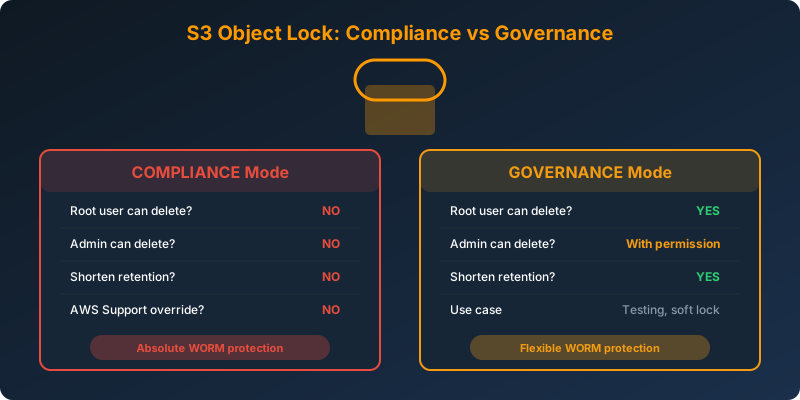
Compliance Mode vs Governance Mode
| Feature | Compliance Mode | Governance Mode |
|---|---|---|
| Root user can delete? | No | Yes (with special permission) |
| Admin can delete? | No | Yes (with s3:BypassGovernanceRetention) |
| Can shorten retention? | No | Yes |
| Can delete the bucket? | No (until all objects expire) | Depends |
Compliance mode is the only mechanism in AWS that prevents everyone from deleting data, including the root user and AWS Support. Once set, the retention period cannot be shortened.
The Full Architecture
1
2
3
Day 0-365:    S3 Standard (immediate access) + Object Lock COMPLIANCE (10 years)
Day 366-3650: S3 Glacier Deep Archive (archived) + Object Lock COMPLIANCE (still active)
Day 3651:     Object Lock expires → objects can be deleted
Make sure to understand: lifecycle transitions (Standard → Deep Archive) work independently of Object Lock. The data moves to cheaper storage, but the lock remains in effect regardless of storage class.
Why Not the Alternatives?
IAM policy to deny deletion — IAM policies can be changed by administrators. A privileged user or the root user can modify or remove the deny policy and then delete the data. This does not provide guaranteed immutability.
S3 Object Lock in governance mode — Governance mode allows authorized users with the s3:BypassGovernanceRetention permission to override the retention. This does not meet the “no one can delete” requirement.
S3 One Zone-IA — Stores data in a single AZ. Does not meet the “maximum resilience” requirement. Both S3 Standard and Glacier Deep Archive store data across 3+ AZs.
S3 Glacier from day one — Violates the “immediately accessible for 1 year” requirement. Glacier retrieval takes hours.
Key Takeaways
- Compliance mode = nobody can delete, not even root
- Governance mode = authorized users can bypass the lock. Use for testing or when some flexibility is needed.
- Object Lock must be enabled at bucket creation — you cannot add it to an existing bucket
- Lifecycle transitions (to Glacier/Deep Archive) work independently of Object Lock
- S3 Object Lock provides WORM (Write Once Read Many) compliance for regulations like SEC 17a-4, FINRA, and HIPAA



 Never miss a story from us, subscribe to our newsletter